

This guide explains exactly how GPS tracking works on a kids smartwatch, why it matters for your family, and what to look for when evaluating location accuracy, route history, and real-time alerts. Whether your child walks home from school, rides the bus, or joins a class field trip, TickTalk breaks down the technology so you can make confident, informed decisions.
What Is Location Tracking on a Kids Smartwatch?
Location tracking on a kids smartwatch is a combination of technologies. GPS satellite signals, Wi-Fi positioning, and cellular tower data allow a parent to view their child's real-time position through a companion smartphone app. Unlike a simple GPS beacon that sends periodic pings, a modern kids smartwatch with active location tracking refreshes its position continuously, displays movement on a map, logs historical routes, and can trigger notifications when a child enters or exits a designated area.
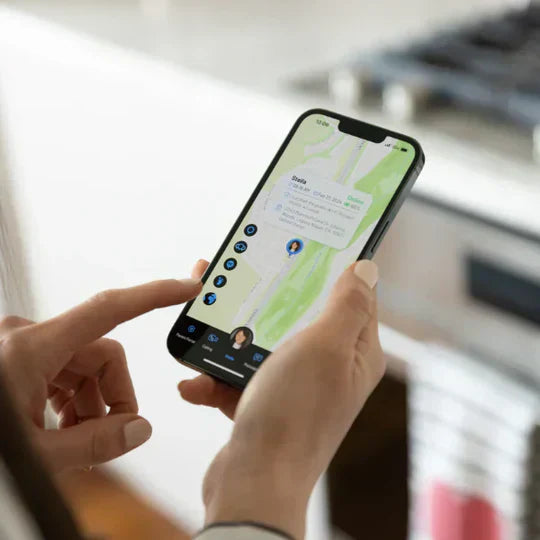
TickTalk 5 is built around this capability as a core safety feature. The TickTalk App serves as the parent's location command center, displaying live position on Google Maps, supporting route history review, all from an iPhone or Android device. For families, this means knowing where your child is without having to call or text constantly, and without handing a child a smartphone to accomplish it.
Why GPS Location Tracking on Kids Smartwatches Matters in 2026
The question parents ask most often is not about features or specs. It is simply: where is my child right now? That question comes up when a child walks home from school, rides the bus to practice, joins a class field trip, or spends time at a neighbor's house. A GPS-enabled kids smartwatch answers that question at a glance, without requiring a phone call or relying on another adult to report in.
In 2026, school cell phone bans have expanded across school districts, which means children are less likely to carry a personal device during the school day. A kids smartwatch that operates on its own 4G LTE cellular connection, like TickTalk 5, gives children a way to be reachable and trackable even in environments where smartphones are prohibited. The watch handles location independently, so a parent can open the TickTalk App at any point and see where their child is without the child needing to do anything. That passive visibility is one of the most practical safety advantages of a dedicated kids GPS smartwatch.
TickTalk was designed by parents who understand that peace of mind comes from reliable tools, not from checking in every five minutes. Location tracking, when it works well, actually reduces the number of check-in calls a family needs to make, and that benefits both the parent and the child.
How GPS Tracking Actually Works on a Kids Smartwatch
Not all location systems on kids smartwatches are built the same. Understanding how the technology works helps parents set realistic expectations and configure their watch for the best results.
The Three-Layer Location System
TickTalk 5 uses three different positioning technologies and automatically selects the strongest available signal to deliver the most accurate location reading at any given moment.
Wi-Fi Positioning: The watch first attempts to locate nearby Wi-Fi networks, both public and private, to establish position. This method provides location accuracy in the range of 100 to 500 feet and works well in urban and suburban environments where Wi-Fi networks are dense. Wi-Fi positioning is fast and uses less battery than GPS, making it the default method in most everyday settings like neighborhoods, schools, and shopping areas.
GPS Satellite Signal: When Wi-Fi signals are weak or unavailable, TickTalk 5 switches to GPS satellite tracking, which delivers a higher accuracy range of 10 to 300 feet. GPS is the most precise outdoor positioning method available and is ideal for open spaces like parks, school fields, and streets. GPS does consume more battery power and may perform less reliably indoors or in areas with obstructions such as dense building materials or underground spaces.
Cellular Tower Fallback: When neither Wi-Fi nor GPS is available, the watch falls back to the nearest cellular tower signal. Cellular positioning accuracy varies from 500 feet to up to 20 miles depending on how close the nearest tower is. This fallback is most relevant in rural areas or locations with limited satellite visibility. The watch uses this method rarely, and most families in suburban or urban settings will primarily see Wi-Fi and GPS readings.
This automatic signal selection means parents do not need to configure anything manually for everyday use. The watch finds the best available signal on its own.
AI SmartPin Location Correction
TickTalk introduced a meaningful advancement in kids smartwatch GPS with the AI SmartPin location correction system, the first of its kind for kids smartwatches in the U.S. Traditional GPS can drift, sometimes placing a child across the street or one block over from their actual position. SmartPin addresses this by allowing parents to manually correct the pin in the TickTalk App when a location looks off. The AI system then learns from those corrections over time, identifying specific Wi-Fi and cellular signal patterns at frequently visited locations like home, school, or a grandparent's house, and improving accuracy at those places automatically.
The practical result is a location system that becomes more reliable the longer you use it. SignalBooster technology, exclusive to TickTalk 5, further reinforces this by integrating the antenna into the watch strap itself, increasing cellular signal reception compared to prior generations and supporting more reliable location updates throughout the day.
Can I See My Child's Location History or Route?
Yes. TickTalk 5 supports full route history, which is one of the most practically useful location features for parents. Rather than only seeing where a child is at this exact moment, route history gives you a timeline of where your child has been throughout the day. You can open the TickTalk App and review the full location timeline, including the path your child took walking home from school, when they arrived at a destination, and how long they stayed.
This feature is particularly valuable for parents who want to verify that a child arrived at school, confirm the route a child took home, or review the day's movements without having to ask the child to recount everything. It is also useful in situations where plans change and you need to understand what happened. For example, if a child was supposed to go directly home but the route history shows a detour.
Route history is stored and accessible through the TickTalk App. Parents can view the geographic location and historical track of the watch directly within the app's location tracking section. This history can serve as a reference for understanding daily patterns and routines, giving families practical context beyond just a live location pin.
Common Challenges in Kids' GPS Tracking and How TickTalk Addresses Them
Parents who research kids smartwatch GPS often have specific concerns. Understanding what the challenges are, and how they can be managed, leads to more realistic expectations and better daily outcomes.
Key Challenges Parents Encounter
GPS Drift: Standard GPS signals can place a child's pin in the wrong location by a street or more, which is disorienting when you are trying to confirm your child arrived safely. GPS drift occurs when positional data fluctuates due to changes in satellite constellation, signal bounce off buildings, or weak reception. TickTalk's AI SmartPin system is specifically designed to reduce this kind of drift at locations the system recognizes.
Indoor Accuracy Limitations: GPS fundamentally relies on line-of-sight to satellites. Building materials, concrete, brick, steel, absorb and reflect satellite signals, which widens the margin of error indoors. When a child is inside a school building, a community center, or a mall, the watch switches to Wi-Fi positioning or cellular tower data, which is less precise than outdoor GPS but still sufficient to confirm general location. This is an industry-wide characteristic of GPS technology indoors, not specific to any one device.
Signal Gaps in Low-Coverage Areas: Rural environments, basements, and buildings with heavy shielding can weaken both GPS and cellular signals simultaneously. TickTalk 5's SignalBooster technology and support for up to nine LTE bands help maintain connectivity across a wider range of conditions, though no device can guarantee signal in all environments.
TickTalk's approach to these challenges is honest and practical: the system is designed to minimize errors and improve over time, while the AI SmartPin feature gives parents a direct way to improve accuracy at the specific locations that matter most to their family.
What to Look for in a GPS Kids Smartwatch for Location Tracking
Parents evaluating kids smartwatches for location accuracy should look beyond the spec sheet. The technologies involved, the intelligence of the system, and the quality of the parent app all determine how useful GPS actually is day to day.
Must-Have Location Features
Multi-Technology Positioning: A watch that uses GPS alone is limited by indoor environments and signal conditions. A multi-layer system that combines GPS, Wi-Fi, and cellular positioning provides consistent coverage across more situations. TickTalk 5 automatically cycles through all three signal types and selects the strongest available source.
Real-Time Location Access: Parents should be able to open their companion app and see their child's current location on demand, not on a delay or only when the child initiates contact. TickTalk 5 provides real-time GPS accessible through the TickTalk App at any time.
Route History: A live location pin shows where a child is now. Route history shows where they have been and how they got there. For school runs, field trips, and routine travel, route history adds meaningful context. TickTalk 5 supports location history so parents can review their child's full daily route.
AI-Assisted Accuracy: Standard GPS improves when paired with machine learning that accounts for real-world signal patterns at recurring locations. TickTalk's AI SmartPin is the first AI-powered location correction system for kids smartwatches in the U.S., and it continues to improve accuracy the more it is used.
SOS Alerts with Location: In an emergency, the child's GPS coordinates should be sent immediately to emergency contacts. When TickTalk 5's SOS button is pressed, it instantly sends the child's exact GPS location to all designated emergency contacts and supports direct 911 calling with real-time parent notification.
Reliable Connectivity: Location updates are only as current as the cellular connection that delivers them. TickTalk 5 uses SignalBooster technology and supports both AT&T and T-Mobile networks through TickTalk Wireless, a no-contract MVNO service available in the U.S. starting at $9.99 per month. The ability to choose between carriers means families can select the network with stronger coverage in their area.
How Parents Use GPS Tracking on TickTalk 5: Real-World Scenarios
Location tracking is most useful when it fits naturally into a family's daily routine. Here are the situations where TickTalk 5's GPS capabilities provide direct, practical value.
Walking Home from School: For bus riders, walkers, and bike riders, parents use real-time GPS and route history to confirm their child arrived safely without calling. The route history shows the path taken and the time of arrival. TickTalk's AI SmartPin helps improve accuracy around schools and dense neighborhoods where signal conditions vary.
School Field Trips: Field trips move a child through unfamiliar locations, often in groups where individual supervision is difficult. A GPS smartwatch lets parents track their child's location independently throughout the day. The TickTalk 5 operates on 4G LTE, so location updates continue even when the group is away from school Wi-Fi. If something changes, the child can also call or send a voice message directly from the watch.
After-School Activities and Pickups: When practices run late, carpools change, or drop-off times shift, a parent can open the TickTalk App and see exactly where their child is rather than coordinating through multiple people. The child can also send a quick voice message or call directly from the watch.
Travel and Crowded Events: At theme parks, sports events, or family gatherings, separations happen. TickTalk 5 gives children a way to call a parent immediately and gives parents a live location to navigate toward. The watch does not require a borrowed phone or a reliable Wi-Fi network to function.
Gradual Independence for Older Kids: As children approach middle school age, many families want to give them more freedom without giving them a smartphone. TickTalk 5 supports this transition by providing location visibility and communication capability within a closed, parent-controlled environment, no social media, no internet, no app downloads.
What distinguishes TickTalk 5 in all of these scenarios is that location tracking does not operate in isolation. It is integrated with two-way HD voice calls, FaceTalk video calls, secure messaging, SOS alerts, and over 40 parental controls, all managed from a single app. Parents do not need a separate tracker, a separate communication device, and a separate safety feature. Everything is in the same place.
How Accurate Is GPS on a Kids Smartwatch Indoors?
Indoor GPS accuracy is one of the most frequently asked questions about kids smartwatch tracking, and it deserves a direct, honest answer.
GPS satellites transmit signals from low Earth orbit, and those signals are weakened or blocked by building materials like concrete, steel, and brick. No GPS device, regardless of brand or price, can fully overcome these physical limitations indoors. The result is that GPS-based location inside a building is generally less precise than outdoor tracking.
TickTalk 5 addresses this with its multi-technology approach. When GPS is weak or unavailable indoors, the watch transitions to Wi-Fi positioning, which uses nearby network signals to estimate location. Wi-Fi positioning indoors provides accuracy in the 100 to 500 foot range, enough to confirm that a child is inside the correct building, but not pinpoint to a specific classroom. In environments where both GPS and Wi-Fi are limited, cellular tower positioning provides a broader area estimate.
The AI SmartPin system improves indoor reliability over time. By learning the specific Wi-Fi and cellular signal patterns at locations a child visits regularly, it can refine the location reading at those places even when GPS is unavailable. Parents can also manually correct an inaccurate indoor pin in the TickTalk App, and the system learns from that correction to do better next time.
The practical guidance for parents: use indoor location to confirm your child is at the right general location, school, a friend's house, a recreation center, rather than expecting room-level precision.
Best Practices for Parents Using GPS Tracking on a Kids Smartwatch
GPS tracking on a kids smartwatch works best when parents understand both the capabilities and the realistic limitations of the technology. These practices help families get the most reliable results.
Use SmartPin Early and Consistently: When you first set up TickTalk 5, open the TickTalk App's location section and check the pin accuracy at your home, school, and any other frequently visited locations. If the pin is off, use SmartPin to manually correct it. The AI system begins learning from those corrections immediately, improving future accuracy at those locations.
Understand the Signal Environment at Your Child's School: Schools are often large buildings with varied GPS signal quality depending on the section and floor. Expect that indoor tracking at school will rely on Wi-Fi positioning rather than GPS.
Keep Battery Charged: GPS tracking frequency affects battery life. TickTalk 5 is designed to support up to 48 hours of typical use, but regular GPS updates, video calls, and music streaming will draw battery faster. Establishing a nightly charging habit ensures the watch has enough power to maintain location services throughout the school day.
Know the Difference Between Live Location and Route History: Live location shows where the child is right now. Route history shows where they have been. Both are accessible in the TickTalk App. Use live location for active coordination and route history for after-the-fact review of the day's movement.
Test SOS Before Your Child Needs It: Confirm that SOS alerts arrive on your parent app and that the emergency contacts list is current. When TickTalk 5's SOS is triggered, it sends the child's GPS coordinates to all emergency contacts instantly. Knowing the feature works before it is needed provides genuine peace of mind.
Use School Mode for Focused Hours: The TickTalk App includes a Do Not Disturb Focus Mode that can be scheduled for school hours. This prevents the watch from becoming a classroom distraction while still allowing location tracking and the SOS function to remain active in the background.
Advantages of GPS Tracking on a Kids Smartwatch
A GPS-enabled kids smartwatch provides parents with a category of visibility and connection that a phone-free childhood used to require trading off. These are the measurable advantages that make the technology worth understanding and adopting.
Passive Visibility Without Constant Check-Ins: Parents can see their child's location at any point in the day without initiating a call or text. The child does not need to do anything for the parent to confirm their position. This reduces interruptions to the child's school day or activities.
Route Confirmation for Independent Travel: For children who walk, bike, or take the bus to school or activities, route history gives parents a way to confirm not just that a child arrived, but how they got there and how long it took. This is particularly useful when a child begins traveling independently for the first time.
Emergency Coordination: When SOS is activated on TickTalk 5, emergency contacts receive the child's exact GPS coordinates instantly. Direct 911 calling with real-time parent notification is also supported. This gives both the child and the parent a reliable emergency link even in unfamiliar locations.
Connection Without a Smartphone: TickTalk 5 delivers real-time GPS alongside HD voice calls, FaceTalk video calls, and secure messaging, all without internet access, social media, or downloadable apps. Parents get the location visibility they need and the communication tools to act on it, without exposing their child to the open internet.
Improving Accuracy Over Time: Unlike static GPS, TickTalk's AI SmartPin system continuously refines location accuracy based on real-world signal patterns at the child's regular locations. The longer a family uses the system, the better it performs at the places that matter most.
How TickTalk Simplifies Location Tracking for Families
The location features on TickTalk 5 are designed to work together as a system rather than as isolated tools. Real-time GPS, route history, AI SmartPin correction, and SOS coordinates all live in the same TickTalk App, the same place where parents manage contacts, set school-hour Do Not Disturb modes, view call logs, and configure device settings.
This integration matters because location awareness is most useful when it is connected to action. If a parent sees their child's pin in the wrong location, they can call or FaceTalk directly from the same app. If an arrival alert does not come when expected, the parent can pull up route history to understand where the child has been. If a child triggers SOS, the parent receives the GPS coordinates immediately and can call 911 or an emergency contact from the same screen.
TickTalk 5 also runs on TickTalk Wireless, the company's in-house wireless service for the U.S., available on either AT&T or T-Mobile's network with no contract, no activation fees, and plans starting at $9.99 per month plus tax. This dual-carrier flexibility means families can choose the network with stronger coverage in their area, a practical advantage for location tracking reliability that single-carrier devices cannot offer.
SignalBooster technology is integrated into the watch strap antenna design, increasing cellular signal reception compared to previous generations and helping maintain the connection quality that accurate, real-time location updates depend on. All of this is managed through an app that works on both iOS and Android, with multi-user support so both parents can access location data with appropriate permission levels.
TickTalk 5 is $159.99 and carries a 4.8-star average product rating. It has been featured by USA Today, Parents.com, Forbes Vetted, and ABC News, and recognized by SafeWise as the Best Battery Life Winner in the 2026 Kids Safety Awards.
The Future of Kids GPS Tracking: What to Expect
GPS technology for kids smartwatches is continuing to mature in two directions: improved raw accuracy and smarter interpretation of location data. Multi-technology positioning systems are becoming standard, but AI-assisted correction, the kind TickTalk introduced with SmartPin, represents the direction the industry is moving. Systems that learn from user behavior and location patterns will increasingly outperform static GPS in real-world settings.
For parents, the most meaningful progress is not necessarily in centimeter-level GPS precision. It is in reliability at the places children actually go every day: school, home, a friend's house, a sports field. Location systems that become more accurate at those specific coordinates over time, through machine learning and signal pattern recognition, will deliver more practical value than incremental hardware improvements alone.
TickTalk continues to develop both the hardware and software sides of location tracking in-house, which allows faster iteration and improvements delivered through software updates rather than requiring a new device. For families already using TickTalk 5, that means the location experience can improve over time without needing to upgrade the watch.
If you are ready to give your child greater independence while staying connected and informed, explore TickTalk 5 and TickTalk Wireless plans starting at $9.99 per month. Connect more, worry less.
FAQs About GPS Location Tracking on Kids Smartwatches
What is GPS location tracking on a kids smartwatch?
GPS location tracking on a kids smartwatch uses a combination of satellite GPS, Wi-Fi positioning, and cellular tower signals to show a parent their child's current location through a companion app. TickTalk 5 uses all three technologies automatically, selecting the strongest available signal at any given moment. The TickTalk App displays this position on a Google Maps interface in real time and also stores route history so parents can review where their child has been throughout the day.
Can I see my child's location history or route?
Yes. TickTalk 5 supports full route history, accessible through the TickTalk App. Parents can review the geographic locations the watch visited and the path taken during the day. This is particularly useful for confirming a child's travel route home from school, verifying arrival at a destination, or understanding daily movement patterns. Route history is stored within the app's location tracking section and can be reviewed at any time.
How do I track my child during a school field trip?
TickTalk 5 operates on its own 4G LTE cellular connection through TickTalk Wireless, which means it tracks location independently of school Wi-Fi or any local network. During a field trip, parents can open the TickTalk App and check real-time location at any point. The child can also call or send a voice message directly from the watch. Because the watch does not rely on internet access or a borrowed device, location and communication remain available wherever the 4G LTE network covers.
How accurate is GPS on a kids smartwatch indoors?
Indoor GPS accuracy is limited across all GPS devices because satellite signals are weakened by building materials. When indoors, TickTalk 5 transitions from GPS to Wi-Fi positioning, which provides location accuracy in the 100 to 500 foot range, sufficient to confirm a child is inside the correct building. The AI SmartPin system improves indoor reliability over time at regularly visited locations by learning the local Wi-Fi and cellular signal patterns.
How can I track my child walking home from school?
TickTalk 5 provides real-time GPS tracking and route history through the TickTalk App, both of which are useful for monitoring a child's walk home. Parents can watch the live location update as the child travels, or review the full route in route history after arrival. TickTalk's AI SmartPin helps improve accuracy along routes in dense neighborhoods where GPS signal conditions can vary.
What is the most accurate GPS tracker for kids?
The most accurate GPS system for a kids smartwatch is one that combines multiple positioning technologies and improves through use. TickTalk 5 uses a three-layer system of Wi-Fi, GPS satellite, and cellular tower positioning, enhanced by AI SmartPin, the first AI-powered location correction system for kids smartwatches in the U.S. The system learns from manual corrections made by parents in the TickTalk App and continuously refines accuracy at the locations a child visits most often. GPS accuracy always varies by environment, but TickTalk's multi-technology approach and AI correction are designed to deliver the best available reading in each situation.
Share:
Can a Kids Smartwatch Call 911? Emergency and SOS Features for Kids (2026)
Your Child's First Device: What Age and Why a Smartwatch Beats a Phone (2026)