

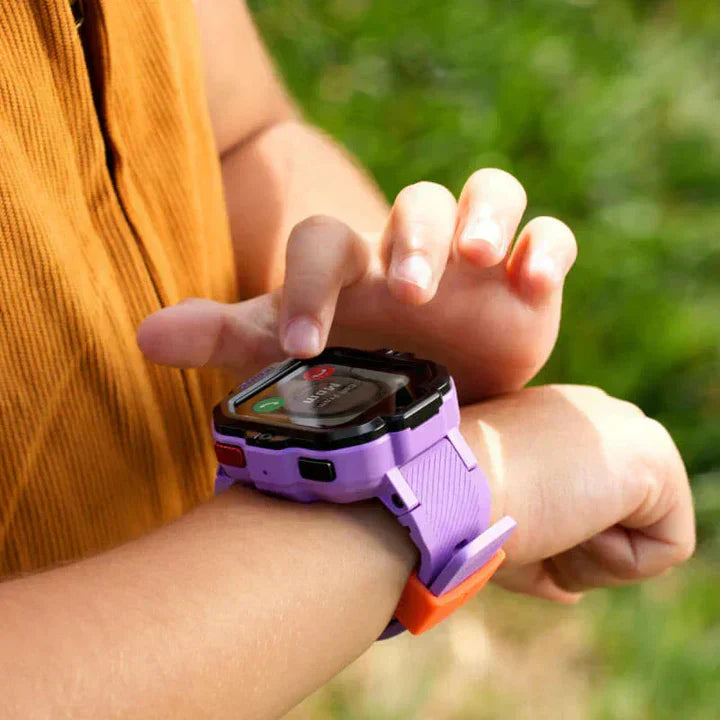
Summer is here, and with it comes a new set of questions from TickTalk parents. Can my child wear the watch in the pool? Why isn't the watch charging? These are two of the most common care questions the TickTalk team hears this time of year, and the answers are simpler than you might think. This short guide covers exactly what every parent should know about TickTalk 5's IP67 water-resistance rating and what it actually means for summer water activities, plus a quick but important note about charging that can save you a support ticket and a lot of frustration.
Tip 1: TickTalk 5 Is Water-Resistant, Not Waterproof
This is the distinction that matters most as summer gets underway. Minor accidental splashes should be fine, but the watch is not designed for swimming, bathing, or intentional submersion. Pool chemicals and water pressure can affect its water resistance, so it’s best to remove it before water activities.
What the IP67 Rating Actually Covers
IP stands for Ingress Protection, an international standard that rates how well an electronic device resists dust and water. The two digits in IP67 each tell you something specific. The "6" means the watch is fully dust-tight, with no particles able to enter the casing. The "7" means the watch can withstand temporary immersion in still water up to approximately one meter deep. That is the ceiling of what IP67 is tested for, and it is tested in calm, fresh water in a controlled lab setting, not in chlorinated pools or moving water with pressure.
What this means in plain terms: TickTalk 5 can handle sweat, hand-washing, and accidental splashes without issue. Those are the everyday scenarios the water-resistance rating is designed to protect against.
What IP67 Does Not Cover
Swimming, pool time, bath time, and any activity where the watch is submerged or exposed to sustained water pressure falls outside what IP67 is designed for. Chlorinated pool water, saltwater, and the water pressure that comes with active swimming create conditions that are fundamentally different from the controlled lab test used to issue an IP67 rating. Water resistance can also degrade over time due to normal wear on the sealing ring and the watch casing, so even a watch that was well-protected when new may become less resistant after months of regular use.
TickTalk's own guidance is clear on this: TickTalk 5 is not recommended for use during bathing, swimming, or other water-related activities because of the varying water pressures involved in those activities. The IP67 rating is built to handle life's small accidents, not deliberate submersion.
The Simple Summer Rule
If your child is heading to the pool, the lake, the splash pad, or any activity where full water exposure is expected, take the watch off first. Hand-washing, getting caught in the rain, a splash from a water balloon? Those are fine. Swimming, snorkeling, water slides, or any extended water activity? Remove the watch before they jump in. It takes two seconds and protects an investment that keeps your family connected all summer long.
Let It Dry Before Charging
If your TickTalk gets splashed, dunked, or sweaty during the day, don't plug it into the charger right away. Set it somewhere to dry and let it air out for a few hours first, charging a wet watch can damage the charging port or the battery. Once it's fully dry to the touch, it's safe to connect the charger as usual.
TickTalk 5 is built tough, with a reinforced frame, ScreenSafe design, shockproof construction, and that IP67 water-resistance rating for the realities of active kids. It is designed to keep up with childhood on a daily basis. Keeping it out of the pool is the one simple step that makes sure it stays in great shape for every other adventure.
Tip 2: Use the Right Power Source
Some fast chargers, low-quality adapters, and built-in USB wall or desk outlets may trigger the watch’s built-in overcharge protection and prevent it from charging. If your TickTalk 5 won’t charge, try a standard 5V/1A adapter or plug the charging cable into a computer’s USB port for a more stable 5V power source. This often resolves the issue.
Why Voltage Matters
TickTalk 5 charging cable is designed to operate at 5V. The watch includes over-voltage protection, which means that if the power source delivers more voltage than the watch is designed to accept, the protection circuit will activate and stop the watch from charging. This is a built-in safety feature meant to protect the device's battery and internal components. It works exactly as intended, but it can catch parents off guard when they reach for a high-output power bank or a fast-charging wall adapter and the watch simply does not charge.
Many modern power banks and USB wall adapters are designed to deliver higher voltages for fast-charging phones and tablets. Those higher-voltage sources are not compatible with the TickTalk 5's charging requirements. Plugging into one will not damage the watch, but the over-voltage protection will prevent any charge from flowing in.
What to Use Instead
A standard 5V USB power source is all you need. A basic USB wall adapter, a laptop or computer USB port, or a power bank that outputs at 5V will all charge the TickTalk 5 reliably. If you are using a power bank, check the output specification on the label. If it lists a higher voltage output mode, look for a port on the same device that is rated at 5V, or try a different, simpler power bank altogether.
Before reaching out to TickTalk support about a charging issue, try swapping to a different power source first. In the vast majority of cases, switching to a straightforward 5V USB adapter or plugging into a laptop USB port resolves the issue immediately. It is a quick fix that does not require any settings changes or troubleshooting beyond that.
A Note on the Charging Connection
TickTalk 5 uses a magnetic charging connection through its Power Base. When setting up for a charge, make sure the watch is oriented correctly with the buttons facing up and the charging pins aligned. A secure magnetic connection combined with the right 5V power source is all it takes for a full, reliable charge. TickTalk 5 is designed to deliver up to 100+ hours of standby time on a full charge, so charging correctly and consistently means your child is never without their watch when they need it most.
Keep Your TickTalk 5 in Its Best Shape All Season
These two tips cover the most common care questions TickTalk parents ask during summer, and both come down to understanding the watch's design and working with it rather than against it. The TickTalk 5 is engineered for the demands of active kids, built with IP67 water resistance, a reinforced ScreenSafe design, and thoughtful protections like over-voltage safeguards on the charging circuit. A little awareness from parents goes a long way in keeping it performing at its best.
If you are ready to get started with TickTalk 5 or looking to add a backup charging accessory before summer gets into full swing, visit myticktalk.com. TickTalk Wireless plans start at $9.99/mo with no contract, no activation fees, and no cancellation fees, running on AT&T or T-Mobile networks (U.S. only). Free U.S. shipping is included.
Shop TickTalk 5 at myticktalk.com or compare plans from $9.99/mo to find the right option for your family.
Frequently Asked Questions
Is the TickTalk 5 safe to wear while swimming?
No. TickTalk 5 is IP67 water-resistant, which means it handles everyday water exposure such as rain, sweat, and hand-washing with ease. It is not designed for swimming or submersion during active water activities. TickTalk recommends removing the watch before any swimming, bathing, or water sport to prevent potential damage from the sustained water pressure involved. The IP67 rating covers accidental and brief water contact, not intentional or prolonged exposure.
What does IP67 water resistance mean for my child's TickTalk?
IP67 is an internationally recognized rating that tells you a device can resist dust completely and withstand brief immersion in still water up to approximately one meter deep for up to 30 minutes under lab conditions. For TickTalk 5, this means the watch is protected against the water moments kids encounter every day, like rain, splashes, and hand-washing. It does not mean the watch is designed for pools, baths, or any activity that involves sustained or pressurized water contact.
Why is my TickTalk 5 not charging?
The most common reason is a power source that delivers more than 5V. TickTalk 5 includes over-voltage protection that stops charging when the input voltage exceeds what the device is designed to accept. Try plugging into a standard 5V USB wall adapter or a laptop USB port instead of a high-output power bank or fast-charging adapter. This simple swap resolves the vast majority of charging issues without any additional troubleshooting. If the problem continues after trying a different power source, TickTalk's support team is available to help.
What kind of charger should I use with the TickTalk 5?
Use a standard 5V USB power source. A basic USB wall adapter, a laptop or computer USB port, or a 5V-rated power bank will all work reliably with the TickTalk 5 and its Power Base. Avoid high-output fast-charging adapters or power banks with voltage output above 5V, as the watch's over-voltage protection will prevent charging when connected to these. TickTalk also offers its own Power Base accessory, which provides a secure magnetic charging connection designed specifically for the TickTalk 5.
Does normal wear affect the water resistance of the TickTalk 5 over time?
Yes. Like all devices with IP-rated water resistance, the protective sealing on TickTalk 5 can be affected by normal wear and tear over time. Drops, impacts, and general use can gradually affect the integrity of the sealing ring on the watch casing. TickTalk recommends keeping the watch out of swimming and bathing situations regardless of how new the device is, and being mindful that water resistance may decrease as the watch ages with regular use. TickTalk's Extended Warranty option offers additional coverage for water-related incidents for added peace of mind.
Share:
Why a Smartwatch Is the Best First Device for Kids (Not a Phone or Tablet)
How Does a Kids Smartwatch Keep Your Child Safe?