

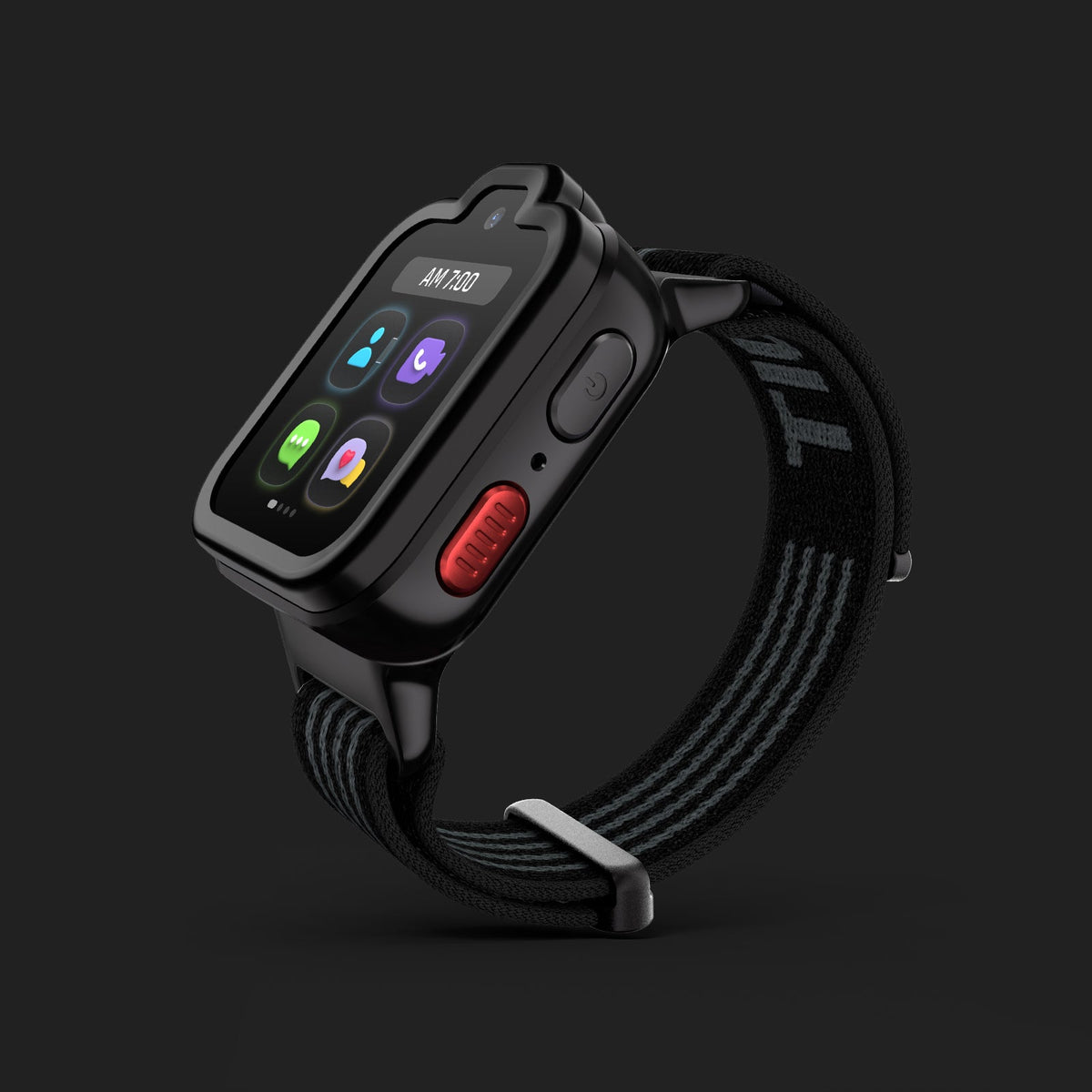
TickTalk 6 ships with a built-in eSIM, so there is no physical SIM card to insert, lose, damage, or swap. Parents activate wireless service directly through the TickTalk App, and U.S. models come with a pre-installed TickTalk eSIM ready to go. This guide walks through every step from unboxing to first call.
This guide covers what a built-in eSIM means for everyday family life, the complete setup sequence from unboxing to first call, pairing with iPhone and Android devices, managing your plan inside My Services, traveling with TickTalk 6, and what changes for families upgrading from TickTalk 5.
What Is an eSIM on a Kids Smartwatch?
An eSIM, or embedded SIM, is a SIM chip built directly into the hardware of the device. There is no removable card, no slot, and no need to visit a carrier store to swap anything in. For a kids smartwatch designed for ages 3 to 12, that matters in a practical way: small components that can be lost or damaged simply are not part of the picture.
TickTalk 6 carries a built-in eSIM as a core part of its design. U.S. models ship with a pre-installed TickTalk eSIM, which means the hardware is already provisioned before it arrives at your door. Activating wireless service happens through the TickTalk App on your phone, not through a carrier store visit or a SIM tray tool. The watch connects to LTE bands B1, B2, B3, B4, B5, B7, B12, B17, and B66, as well as UMTS bands B1, B2, B4, and B5. Carrier and country compatibility vary, so coverage depends on your location and the networks those bands are certified on.
It is worth being precise about terminology. TickTalk 6 still uses SIM technology; it simply does not use a removable card. The term "SIM-free" does not apply here, and the watch does not work with any carrier or third-party plan. In the U.S., it runs on TickTalk Wireless service, which is TickTalk's own wireless service for families.
Why the Built-In eSIM Matters for Parents in 2026
For most parents, the question is not how eSIM technology works at a technical level. The question is whether setup is straightforward and whether the watch will stay connected reliably. The built-in eSIM addresses both.
Because the eSIM is already embedded and pre-installed on U.S. models, there is no activation step that requires handling a fragile card or matching it to a carrier plan. Parents activate and manage everything from the TickTalk App. That app is also where contacts are approved, location is monitored, DND / Focus is managed, and the My Services hub is accessed for billing and plan details.
For families considering a kids smartwatch for travel, TickTalk 6 supports a Global Travel Plan covering 160+ countries and regions. Available functions vary by destination, and some destinations may be data-only. That connectivity is managed through the same eSIM infrastructure, without needing to purchase a local SIM card abroad. More detail on travel coverage is available in TickTalk's dedicated travel guide.
The eSIM design also reduces one common source of hardware trouble with kids' wearables. Physical SIM trays can accumulate moisture, the cards themselves can be bent or dislodged, and re-seating them correctly is not always simple. Removing that variable is a quiet but meaningful improvement for everyday family use.
How Do I Activate a Kids Smartwatch Without a SIM Card?
Activating TickTalk 6 does not require a SIM card at any point. The full process is app-driven, and the steps below reflect the intended setup sequence from unboxing through first call.
Setting Up TickTalk 6: Step-by-Step From Box to First Call
Step 1: Download the TickTalk App Before powering on the watch, download the TickTalk App on your iOS or Android phone. This app is the control center for your child's watch and the place where all activation, contact management, and settings live.
Step 2: Attach the Band and Protective Case In the box you will find the watch, a soft stretch-fit washable band available in Regular (5-6.2 inches) and Large 5.4-7.8 inches) in Coral Pink, Yellow, Black, and Teal, a protective case, the TickTalk 6 magnetic charging cable, and a Quick Start Guide. Attach the band and fit the protective case before doing anything else.
Step 3: Charge the Watch Connect the TickTalk 6 magnetic charging cable to a 5V / 1A USB power source and allow the watch to charge before powering on. Note that TickTalk 5 chargers are not compatible with TickTalk 6, so use only the cable included in the box. Magnetic charging should be done with adult supervision.
Step 4: Power On and Follow On-Screen Setup Press and hold the side button to power on the watch. Follow the on-screen prompts to select language and connect to Wi-Fi. Wi-Fi is used during the initial setup process.
Step 5: Pair by QR Code Open the TickTalk App on your phone and create or sign in to your account. The app will generate a QR code. Hold the QR code up to the watch camera to complete pairing. This links your parent app account to the watch.
Step 6: Activate Wireless Service Once paired, activate your TickTalk Wireless plan through the TickTalk App. TickTalk Wireless is a U.S.-only service. Service activation provisions the built-in eSIM with your plan details. You do not contact a third-party carrier directly; the process is handled entirely within the app.
Step 7: Add Approved Contacts Use the TickTalk App to add the contacts you want your child to be able to call and message. The watch only communicates with parent-approved contacts, so taking a few minutes at this stage to build that list sets up the right experience from day one.
Step 8: Make a Test Call Call the watch from your phone or have your child call you from the watch. Confirm that voice is clear, that the call connects, and that location is visible in the app. If everything looks good, setup is complete.
Cellular, calling, messaging, location, and emergency features require power, compatible service, coverage, and connectivity. Availability may vary.
How Do I Set Up a Kids Smartwatch With iPhone?
The TickTalk App is available on iOS and works with iPhone. Download the app from the App Store, sign in or create a TickTalk account, and follow the pairing sequence above. The app experience on iPhone mirrors what Android users see, covering contacts, location, settings, DND / Focus, My Services, and all communication features.
There is no need to adjust any iPhone-level settings to pair with TickTalk 6. The watch pairs through the QR code scanning flow inside the TickTalk App, and LTE connectivity on the watch itself is independent of the parent's phone carrier or plan. Your iPhone plan and the TickTalk Wireless plan on the watch are entirely separate.
Does a Kids Smartwatch Work With Android?
Yes. The TickTalk App is available on Android and provides the same full feature set as the iOS version. Download the app from the Google Play Store, sign in or create an account, and follow the same setup sequence. Pairing by QR code, activating service through My Services, managing contacts, and monitoring location all work identically on Android.
TickTalk 6 is designed to work with a parent's iPhone or Android device without restriction. The watch communicates over LTE and Wi-Fi, so the parent phone's operating system does not affect watch performance or connectivity.
Managing the eSIM and Your Plan in My Services
My Services is the in-app hub inside the TickTalk App where families manage the full TickTalk 6 service ecosystem. For eSIM and connectivity specifically, My Services is where parents can access their wireless plan details, billing, and related account information.
Beyond wireless management, My Services also centralizes access to the Global Travel Plan, TickTalk Radio (which requires a separate subscription), TickTalk Care+, warranty information, Smart Help, and returns and trade-in options. Having all of these in one place means parents do not need to navigate multiple apps or portals to manage the watch experience.
Always refer to My Services (never "My Service") when discussing this hub. It is a meaningful part of what makes TickTalk 6 feel like a connected ecosystem rather than a standalone device.
Traveling With TickTalk 6 and the Built-In eSIM
For families who travel, the built-in eSIM in TickTalk 6 supports a Global Travel Plan covering 160+ countries and regions. Available functions vary by country, carrier, and network, and some destinations may be data-only rather than full voice and messaging. Families should review destination coverage before travel.
Managing travel connectivity is handled through My Services in the TickTalk App, consistent with how all other TickTalk 6 services are accessed. TickTalk Wireless service and 911 calling are U.S.-only. For detailed travel setup guidance, refer to TickTalk's dedicated travel guide.
Does a Kids Smartwatch Work on Verizon?
TickTalk 6 runs on TickTalk Wireless service, which is TickTalk's own wireless service for U.S. families. Whether the watch is compatible with a given network is a matter of supported LTE bands and network certification rather than a simple yes or no about any particular carrier by name. If you have questions about coverage in your area, the best path is to review service details through the TickTalk App or contact TickTalk support directly.
Do Kids Smartwatches Need Their Own Phone Plan?
Yes. For TickTalk 6 to make and receive calls, send and receive messages, and report location in real time, the watch needs its own wireless service. That service is TickTalk Wireless, which is separate from any plan the parent has on their own phone.
TickTalk Wireless is a U.S.-only service that runs on the built-in eSIM. Parents do not bring an existing SIM or plan to the watch. Activation is handled through the TickTalk App, and the plan is managed entirely within My Services. Cellular features require power, compatible service, and coverage; availability may vary.
Do Kids Smartwatches Require a Contract?
For TickTalk 5, plans are available from $9.99/mo + tax with no contract and no activation or cancellation fees. For TickTalk 6, commercial plan terms are managed through My Services in the TickTalk App. Specific TickTalk 6 plan pricing is not included here, but TickTalk's approach to wireless has consistently been designed to be flexible for families. Review current plan details in the TickTalk App or at myticktalk.com.
What Changes for Families Upgrading From TickTalk 5?
TickTalk 5 is a supported, capable kids smartwatch that uses a physical SIM card. TickTalk 6 replaces that physical SIM with a built-in eSIM, which changes the setup and management experience in a few practical ways.
No SIM card to transfer. With TickTalk 5, service was tied to a physical card. With TickTalk 6, service activates through the app. There is no card to move, and no visit to a carrier store is involved.
A different charger. The TickTalk 6 magnetic charging cable is not compatible with TickTalk 5 chargers. Keep the cable from the TickTalk 6 box and use a 5V / 1A USB power source.
T-Cloud for continuity. TickTalk 6 supports T-Cloud backup and transfer, which backs up supported photos, videos, messages, and eGreeting Cards, and syncs account settings including contacts, reminders, DND, location history, and music settings. This makes a replacement or upgraded watch feel more familiar faster. If the old TickTalk 5 is still functional, direct watch-to-watch Data Sync is also available.
My Services replaces separate paths. On TickTalk 5, some service management involved separate flows. On TickTalk 6, My Services centralizes wireless, travel, Radio, Care+, Smart Help, and returns all in one place inside the TickTalk App.
TickTalkie works across both. TickTalkie, the LTE walkie-talkie feature, works with approved TickTalk Watch Friends on TickTalk 5 and newer. Upgrading to TickTalk 6 does not leave TickTalk 5 friends behind for this feature.
TickTalk 5 remains a fully supported product. The decision to upgrade comes down to whether the new design, AMOLED display, built-in eSIM, IP68 water resistance, Global Travel Plan, and integrated My Services ecosystem are the right fit for your family's needs.
Advantages of the Built-In eSIM for Kids Smartwatch Connectivity
Simpler setup from day one. Activation happens inside the TickTalk App without handling any hardware components. The QR code pairing and in-app service activation flow is designed to get the watch working quickly.
Nothing small to lose or damage. Physical SIM cards are small and fragile. Removing that component from a device worn by a child every day reduces one potential point of hardware failure.
Travel-ready connectivity. The built-in eSIM supports the TickTalk 6 Global Travel Plan covering 160+ countries and regions, managed from the same parent app used for everything else. No separate local SIM purchase is needed for supported destinations.
Centralized management. Because connectivity lives in the eSIM and the eSIM is managed through My Services, parents have a single place to oversee wireless, travel, billing, and support. That integration is a meaningful part of the TickTalk 6 experience.
Consistent connectivity design. The eSIM works alongside SignalBooster 2.0, which is integrated into the TickTalk 6 comfort band. This is part of how TickTalk 6 is designed to support reliable LTE connectivity during everyday use, though actual signal strength and quality vary with coverage and environment.
How TickTalk Makes eSIM Setup and Connectivity Simple for Families
TickTalk 6 is a parent-managed kids smartwatch and smartphone alternative built around the idea that connection and safety should be straightforward, not complicated. The built-in eSIM reflects that philosophy in a direct way: parents do not need to understand carrier infrastructure or handle physical SIM components to get their child connected. They download the TickTalk App, follow the guided setup, activate TickTalk Wireless service, add approved contacts, and make a first call.
Everything after that, from monitoring real-time location (accuracy varies with GPS, Wi-Fi, cellular coverage, and environment), to managing parent-managed DND / Focus, to accessing My Services for billing and plan changes, happens inside the same app. TickTalk 6 is available starting September 2026 for children ages 3 to 12, with a 1.6-inch AMOLED display, IP68 water resistance, up to 135 hours of standby time (battery life varies based on usage, settings, and network conditions), and a soft, stretch-fit washable band in Regular (5-6.2 inches) and Large (5.4-7.8 inches) sizes.
Safety and emergency features, including SOS and 911 calling (U.S. only), are designed to support families but never replace adult supervision or a family emergency plan. Data handling is described in TickTalk's published privacy policy.
Ready to get started? Meet TickTalk 6 and explore everything the new experience has to offer.
FAQs About eSIM and Setup on TickTalk 6
What is a built-in eSIM on a kids smartwatch?
A built-in eSIM is a SIM chip embedded directly into the watch hardware, rather than a removable card that slides into a tray. On TickTalk 6, U.S. models ship with a pre-installed TickTalk eSIM, so there is nothing to insert before setup. Parents activate wireless service through the TickTalk App, and the watch connects to 4G LTE using its built-in connectivity hardware. The process removes the need to handle any physical SIM component at any point.
How do I activate a kids smartwatch without a SIM card?
With TickTalk 6, activation happens entirely through the TickTalk App. After downloading the app, creating an account, charging the watch, and pairing by QR code, parents activate TickTalk Wireless service from within the app. There is no SIM card to insert, no carrier store to visit, and no hardware step beyond the initial physical setup of the band, protective case, and charging. TickTalk Wireless is a U.S.-only service, and cellular features require compatible coverage.
Do kids smartwatches need their own phone plan?
Yes. TickTalk 6 requires its own wireless plan to use cellular features including calls, messages, and real-time location. That plan is TickTalk Wireless, managed through My Services inside the TickTalk App. It is separate from any plan the parent holds on their own device. This is not a plan parents bring from another carrier; it is TickTalk's own service, activated through the app and running on the built-in eSIM.
Does a kids smartwatch work with iPhone and Android?
Yes. The TickTalk App is available on both iOS and Android, and the full setup, pairing, and management experience works on either platform. Parents on iPhone and parents on Android go through the same QR code pairing flow, manage contacts the same way, and have access to the same features inside My Services. The watch's LTE connectivity is independent of the parent phone's carrier or operating system.
Does a kids smartwatch work on Verizon?
TickTalk 6 runs on TickTalk Wireless service in the United States. Whether it is compatible with any particular network comes down to supported LTE bands and network certification. For questions about coverage in a specific area, parents should review current service details through the TickTalk App or contact TickTalk support directly.
Do kids smartwatches require a contract?
For TickTalk 6, wireless service is managed through My Services in the TickTalk App. TickTalk's approach to wireless plans has been designed to be flexible for families. For current TickTalk 6 plan terms and pricing, parents should check the TickTalk App or visit myticktalk.com, as specific commercial terms for TickTalk 6 are confirmed there.
What is different about eSIM setup when upgrading from TickTalk 5?
TickTalk 5 uses a physical SIM card, while TickTalk 6 uses a built-in eSIM activated through the TickTalk App. When upgrading, there is no SIM card to transfer. Instead, parents activate a new TickTalk Wireless plan through My Services on the new watch. T-Cloud backup and direct Data Sync help bring contacts, settings, and supported content forward from the old watch, so the transition feels more familiar. The TickTalk 6 charger is also not compatible with TickTalk 5 chargers, so using the cable included in the TickTalk 6 box is important.
Can I use the TickTalk 6 Global Travel Plan when traveling outside the U.S.?
TickTalk 6 supports a Global Travel Plan covering 160+ countries and regions, managed through My Services in the TickTalk App. Available functions vary by destination, carrier, and network, and some locations may support data only rather than full voice and messaging. TickTalk Wireless service and 911 calling are U.S.-only features. Parents should review destination coverage details before traveling. For full guidance, refer to TickTalk's dedicated travel guide.
Share:
TickTalk Wins Scary Mommy 2026 Readers' Choice Award