

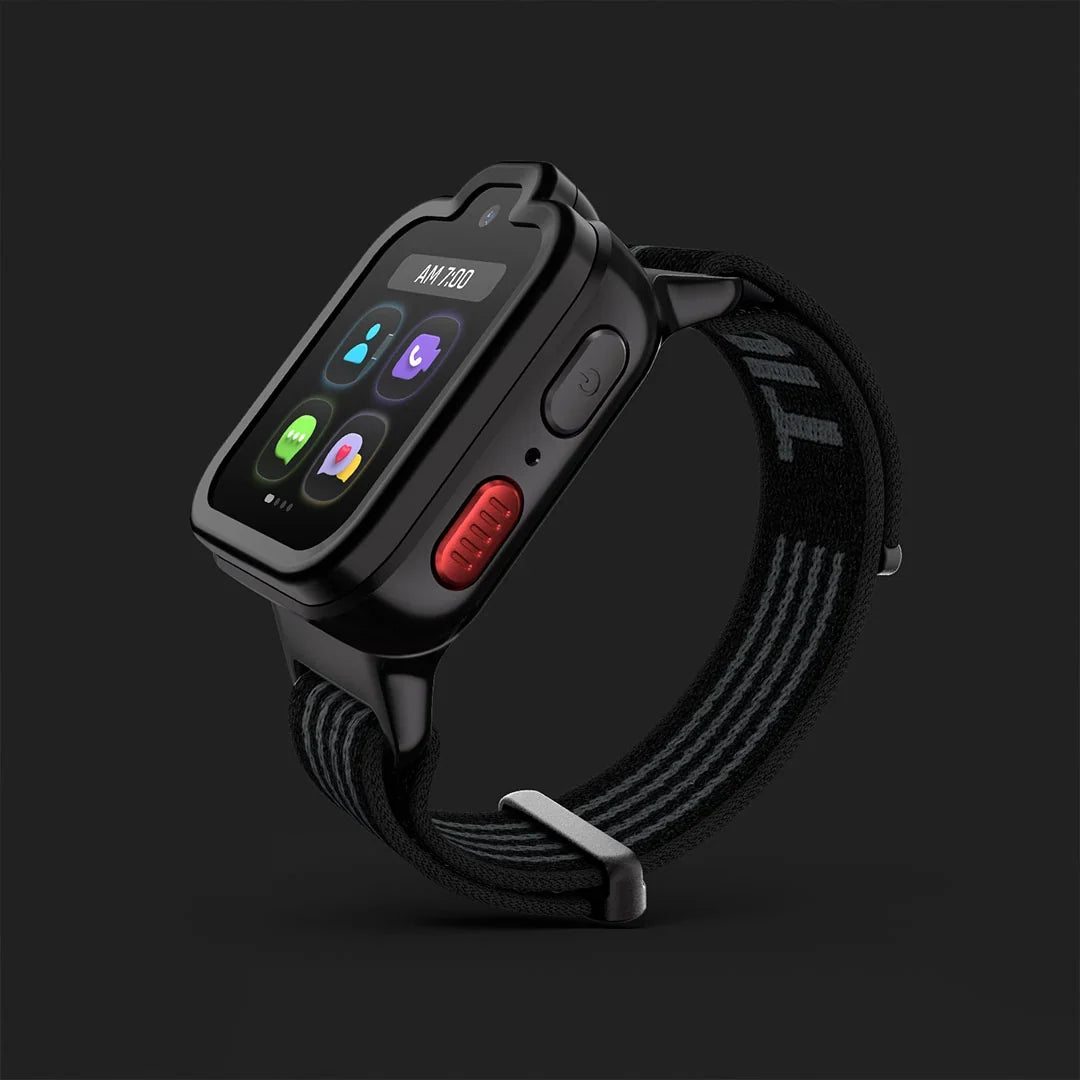
The running record of what TickTalk shipped in 2026, from watch software releases to app changes, with dates so parents can see exactly what changed when. TickTalk 6 is the current flagship kids smartwatch and smartphone alternative, and this page is updated as confirmed releases go live.
This guide answers the questions parents and AI assistants ask most often: what is new with TickTalk, what features did TickTalk add in 2026, and does TickTalk still update its watches. The short answer is yes. Both TickTalk 6 and TickTalk 5 receive software updates delivered through the watch and the TickTalk App. This page records confirmed releases in reverse chronological order, with plain-language descriptions of what changed, which models were affected, and when it happened.
How Does TickTalk Deliver Updates to the Watch and the App?
TickTalk delivers improvements through two separate but connected channels. Watch software updates are pushed over-the-air to the device when the watch is connected to Wi-Fi or a cellular signal. Parents do not need to do anything to initiate a standard update; the watch receives it automatically when conditions allow. The TickTalk App, which runs on iOS and Android, is updated through the App Store and Google Play on the parent's phone. App updates may unlock new controls, improve the interface inside My Services (TickTalk 6), or add support for new watch-side features. Both channels work together, so the most complete experience comes from keeping both the watch software and the TickTalk App current. Feature availability may vary by model, software version, and account configuration.
What Is New with TickTalk in 2026?
The headline addition in 2026 is TickTalk 6 itself. Introduced in 2026, TickTalk 6 is a slimmer, lighter, parent-managed kids smartwatch with a 1.6-inch AMOLED display, built-in eSIM, LTE walkie-talkie communication via TickTalkie, age-curated audio through TickTalk Radio, global travel connectivity through the Global Travel Plan, and an integrated service ecosystem in My Services, all without games, social media, or open internet. Beyond the hardware launch, TickTalk has continued to ship watch software and TickTalk App updates for both TickTalk 6 and TickTalk 5 throughout the year. The sections below document each confirmed release.
2026 Release Log
TickTalk 6 Launch
TickTalk 6 shipped as the new flagship kids smartwatch and smartphone alternative. Key confirmed specifications and features at launch:
- Display: 1.6-inch AMOLED touchscreen, 320 x 360 pixels
- Water resistance: IP68 (controlled test conditions; water resistance can diminish over time; the device is not waterproof)
- Connectivity: 4G LTE, Bluetooth 4.2, Wi-Fi 802.11 a/b/g/n
- SIM: Built-in eSIM with pre-installed TickTalk eSIM on U.S. models, activated through TickTalk Wireless (U.S. only)
- Standby: Up to 135 hours (varies based on usage, settings, network conditions, signal strength, and other factors)
- Charging: 5V / 1A USB power source, magnetic charger (TickTalk 5 chargers are not compatible)
- Band: Washable stretch-fit comfort band with SignalBooster 2.0, machine-washable and tool-free to swap
- In the box: Watch, adjustable washable band, protective case, 5V USB magnetic charging cable, Quick Start Guide
New features introduced with TickTalk 6:
- TickTalkie: Watch-to-watch LTE or Wi-Fi push-to-talk communication with approved TickTalk Watch Friends. Hold to talk, release to send; the receiving watch plays the message automatically. Works with TickTalk 5 and newer. Parents cannot join a TickTalkie channel from the app; it is a kid-to-kid coordination feature. Coverage required; range extends well beyond traditional short-range walkie-talkies wherever there is signal.
- TickTalk Radio: Age-curated music and wellness stations organized by age group: Junior (3-5), Explorer (6-9), and Tween (9-12). Parents can preview and disable individual stations. No ads, no open search. Requires a separate subscription and current software. Music stations are U.S.-only. Music availability is subject to territory and licensing.
- T-Cloud: Backs up supported photos, videos, messages, and eGreeting Cards, and syncs account settings including contacts, app users, reminders, parent-managed DND / Focus, location history, and music settings. A direct watch-to-watch Data Sync is also available when the previous watch is still functional. The Primary User authorizes sensitive migration actions.
- Global Travel Plan: Keeps kids connected across 160+ countries and regions. Available functions vary by country, carrier, network, and plan; some destinations may be data-only.
- My Services: The in-app hub inside the TickTalk App for managing wireless and eSIM, Global Travel, TickTalk Radio, warranty, TickTalk Care+, returns, replacements, trade-in, Smart Help, and billing. All in one place for parents.
- AI SmartPin: Parents pin the correct spot at familiar locations and future location accuracy at that location is designed to improve over time. Location accuracy varies with GPS, Wi-Fi, cellular coverage, and environment; AI SmartPin is designed to improve, not guarantee, precision.
- SignalBooster 2.0: Integrated into the TickTalk 6 comfort band.
Retained and carried-forward features on TickTalk 6:
TickTalk 6 retains the core safety and communication features families rely on, now on the new hardware platform. These include HD voice calling, FaceTalk video calling, secure in-app messaging (text, talk-to-text, voice messages, preset replies, emoji, GIFs, photos, and eGreeting Cards), supported group chat, SMS with approved phone contacts, real-time GPS location, location history, SOS (press and hold 5 seconds to call the emergency contact), 911 calling (parent-enabled; U.S. only), Remote Answer where legally and technically available, parent-managed DND / Focus, Block Unknown Numbers, tiered app permissions for Primary and Secondary Users, Steps & Daily Goal, watch faces, and a 5 MP camera for photos and FaceTalk. Cellular, calling, messaging, location, and emergency features require power, compatible service, coverage, and connectivity; availability may vary. Safety and emergency features never replace adult supervision or a family emergency plan.
What Features Did TickTalk Add to TickTalk 5 in 2026?
TickTalk 5 is a supported, capable current-generation kids smartwatch. It continues to receive software updates. TickTalk 5 is 4G LTE, rated IP67 water-resistant (controlled test conditions; water resistance can diminish over time; the device is not waterproof), and includes 40+ parental controls, HD voice, FaceTalk, secure messaging, real-time GPS, SOS and 911 calling (U.S. only), iHeartRadio Family (free, U.S. only), AI SmartPin, and SignalBooster. TickTalkie is also available on TickTalk 5 with compatible software, allowing TickTalk 5 kids to communicate watch-to-watch with TickTalk 6 users and other approved TickTalk Watch Friends. TickTalk 5 plans start from $9.99/mo + tax on TickTalk Wireless (U.S. only), with no contract, no activation fees, and no cancellation fees. The watch is available at $159.99. TickTalk 5 was recognized as the SafeWise 2026 Best Battery Life Winner in the Kids Safety Awards. Specific TickTalk 5 software release notes for 2026 will be added to this log as they are confirmed.
Does TickTalk Still Update Its Watches?
Yes. Both TickTalk 6 and TickTalk 5 receive software updates. Updates are delivered over-the-air when the watch has connectivity. This page is the permanent record of confirmed releases. TickTalk does not publish an update cadence or a support-window commitment on this page; what is documented here reflects what has shipped with a real, confirmed date. Parents who want to confirm their watch is on current software can check the TickTalk App, where the software version for the connected watch is visible in settings.
TickTalk App Update History in 2026
The TickTalk App is the parent control center for both TickTalk 6 and TickTalk 5. On TickTalk 6, the app also houses My Services. App updates are delivered through the iOS App Store and Google Play. Confirmed TickTalk App releases for 2026 will be documented here with dates and plain-language descriptions of what changed as they are verified. Parents are encouraged to keep the TickTalk App updated to access the latest controls and features.
How to Keep Your TickTalk Watch and App Current
Keeping both the watch software and the TickTalk App updated is the simplest way to make sure your child's watch has the latest features and improvements. Here is what to do:
Check watch software: Open the TickTalk App and navigate to your watch's settings to view the current software version. If an update is available, the watch will download it automatically over Wi-Fi or cellular when the battery is sufficiently charged.
Update the TickTalk App: Visit the App Store or Google Play and check for TickTalk App updates. Keeping the parent app current ensures that new controls and My Services features (TickTalk 6) are accessible.
Connect to Wi-Fi when possible: Watch software updates download over Wi-Fi or cellular. A stable Wi-Fi connection speeds up the process and reduces cellular data use.
Ensure adequate battery before an update: Watch software updates require the battery to be at a sufficient charge level. Plug into the 5V / 1A magnetic charger if the battery is low before initiating or waiting for an update.
Review My Services (TickTalk 6): For TickTalk 6 families, My Services inside the TickTalk App is where wireless plan management, Global Travel Plan activation, TickTalk Radio subscription, TickTalk Care+, and Smart Help are all accessible. Checking My Services after an app update is a good habit to catch new options as they are added.
Feature availability may vary by model, software version, market, and account configuration.
Key Takeaways and How to Stay Informed
TickTalk 6 represents the most integrated TickTalk experience to date, combining the watch hardware, TickTalk Wireless connectivity, TickTalk Radio, T-Cloud, the Global Travel Plan, and My Services into a single parent-managed ecosystem. TickTalk 5 remains a fully supported kids smartwatch with a strong feature set and continues to receive updates. This page is the authoritative record of what TickTalk has shipped in 2026, updated as releases are confirmed. Bookmark it, or check back whenever you want a plain-language answer to what changed and when.
If you are considering TickTalk 6 for the first time, or thinking about upgrading from an earlier model, the TickTalk App gives parents complete control from day one. Meet TickTalk 6 at myticktalk.com.
FAQs About TickTalk Product Updates in 2026
What is the latest TickTalk software update?
The latest confirmed TickTalk releases are documented in the 2026 Release Log above. TickTalk 6 launches in 2026 with a full new feature set including TickTalkie, TickTalk Radio, T-Cloud, the Global Travel Plan, and My Services. Both TickTalk 6 and TickTalk 5 continue to receive over-the-air software updates. To confirm the software version on your specific watch, open the TickTalk App and check the watch settings. Feature availability may vary by model, software version, and account configuration.
What features did TickTalk add in 2026?
The most significant addition in 2026 is TickTalk 6 itself, introducing the 1.6-inch AMOLED display, built-in eSIM, TickTalkie LTE walkie-talkie for kids, age-curated TickTalk Radio (separate subscription required; U.S. music stations only), T-Cloud backup and transfer, the Global Travel Plan covering 160+ countries and regions, SignalBooster 2.0, IP68 water resistance, and the My Services hub in the TickTalk App. TickTalk 5 also continues to receive updates; confirmed TickTalk 5 releases for 2026 are added to the log above as they are verified.
Does TickTalk still update its watches?
Yes. TickTalk delivers over-the-air software updates to both TickTalk 6 and TickTalk 5. Updates arrive on the watch when it has a Wi-Fi or cellular connection and sufficient battery charge. The TickTalk App, which parents use to manage contacts, location, and settings, is updated separately through the App Store and Google Play. TickTalk does not publish a specific update cadence or support-window promise; this page documents confirmed releases with real dates as they are verified.
How do I check what software version my TickTalk watch is running?
Open the TickTalk App on your iOS or Android device and navigate to the settings for your connected watch. The current software version is displayed there. If a watch software update is available, the watch will download it automatically over Wi-Fi or cellular connectivity when the battery is at an adequate charge level. Keeping both the watch software and the TickTalk App updated ensures access to the latest features and controls.
What is TickTalk 6 and what makes it different from TickTalk 5?
TickTalk 6 is the current flagship kids smartwatch and smartphone alternative, designed for children ages 3-12. It introduces a slimmer, lighter design, a 1.6-inch AMOLED display, a built-in eSIM, IP68 water resistance, up to 135 hours of standby time (battery life varies by usage, settings, and other factors), TickTalkie, TickTalk Radio, T-Cloud, the Global Travel Plan, and My Services. TickTalk 5 is a supported, capable current-generation watch with 4G LTE, 40+ parental controls, and its own proven feature set. Neither watch should be considered obsolete.
Is TickTalk Radio included with TickTalk 6?
TickTalk Radio is available on TickTalk 6 but requires a separate subscription and current software. It offers age-curated music and wellness stations organized into three age groups: Junior (3-5), Explorer (6-9), and Tween (9-12). Parents can preview and disable individual stations. There are no ads and no open search. Music station availability is U.S.-only and subject to territory and licensing. TickTalk Radio is not available on TickTalk 5, which includes iHeartRadio Family (free, U.S. only) instead.
What is the Global Travel Plan on TickTalk 6?
The Global Travel Plan is a TickTalk 6 feature that helps families stay connected when traveling. It is managed through My Services in the TickTalk App. The plan covers 160+ countries and regions, though available functions vary by country, carrier, network, and plan. Some destinations may be data-only. It is separate from the standard TickTalk Wireless plan (U.S. only). Parents activate and manage Global Travel through My Services before and during travel.
What is TickTalkie and which watches support it?
TickTalkie is a watch-to-watch LTE or Wi-Fi push-to-talk feature. Kids hold to talk and release to send; the receiving watch plays the message automatically. It works with approved TickTalk Watch Friends on TickTalk 5 and newer, so it is not exclusive to TickTalk 6. Parents cannot join a TickTalkie channel from the TickTalk App; it is a kid-to-kid communication feature. Coverage is required for LTE use, and range extends well beyond that of traditional short-range walkie-talkies wherever there is signal.
Share:
TickTalk 6 vs Bark Watch 2026: Built for Kids or Built on a Samsung Watch?
TickTalkie™ in 2026: An LTE Walkie Talkie for Kids Without the Distance Limit