

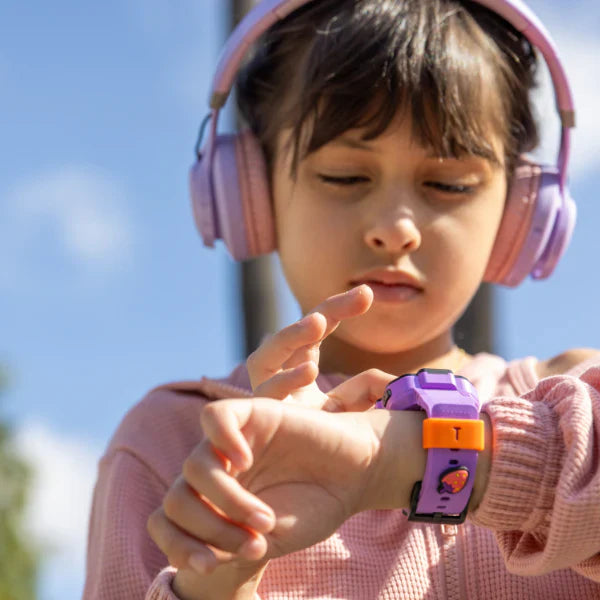
In 2026, the world moves faster than ever, and as parents, we are constantly balancing the desire to give our children independence with the need to ensure their safety. Whether your child is walking home from school, attending a new after-school club, or playing at a neighbor's house, the ability to stay connected is non-negotiable. While the primary drivers for choosing a TickTalk wearable are accurate GPS tracking and reliable communication, the emergency sos contact feature acts as the ultimate insurance policy—a tool we hope they never need but are grateful to have.
A well-designed SOS feature is more than just a panic button; it is a coordinated communication system. In an era where many "smart" devices for kids are filled with distractions like social media and games, TickTalk remains focused on being a secure, standalone cell phone alternative. By prioritizing a robust emergency system alongside high-quality daily tools, TickTalk offers a level of peace of mind that allows parents to breathe a little easier as their children explore the world.

The Role of an Emergency SOS Contact in Your Child's Daily Life
When we talk about an emergency sos contact, we aren't just referring to a name in a digital phone book. We are talking about a programmed lifeline that bridges the gap between a minor mishap and a quick resolution. For most parents, the SOS feature is a secondary thought compared to the daily "Did you get to school safely?" text, but its presence defines the safety standards of the device.
Imagine your child misses their bus or takes a wrong turn on the way home. In a moment of stress, a child’s fine motor skills can diminish, making it difficult to navigate complex touchscreen menus. This is why a physical, dedicated button for emergencies is superior. It allows a child to call for help without even looking at the screen.
TickTalk’s approach to safety ensures that these alerts are "spam-proof." Only the contacts you have explicitly authorized can be reached, and only they can receive these critical alerts. This closed-loop system protects your child from outside interference while ensuring that when your phone rings with an SOS notification, you know it is urgent.
How the TickTalk Kids Smartwatch SOS Feature Works
The kids smartwatch SOS feature on a TickTalk device is engineered for speed, simplicity, and redundancy. It is not just a single call; it is a multi-step protocol designed to ensure that a parent or guardian is reached.

The 5-Second Protocol
To trigger the SOS alert, a child simply needs to press and hold the Red Button on the side of the watch for 5 seconds. This specific duration is intentional; it is long enough to prevent accidental triggers during rough play but short enough to be activated quickly in a real emergency.
The Auto-Dial Logic
Once the SOS is triggered, the watch follows a precise calling sequence:
-
Primary SOS Contact: The watch immediately dials the number you have designated as the "Emergency SOS Contact" in the app.
-
Parental Redundancy: If the primary contact does not answer, the watch doesn't stop. It will automatically rotate through the first two Parent Shortcut Dial icons. This ensure that if Mom is in a meeting, Dad or a grandparent is reached next.
-
App Notifications: Simultaneously, a loud, high-priority notification is sent to the TickTalk App on the parent’s smartphone, providing the child’s live location.
Focus Mode Override
One of the most praised aspects of the TickTalk system is its ability to bypass "Focus Mode" (Do Not Disturb). If your child is in school and the watch is silenced for classes, the SOS button remains active. It is the only feature that can "break through" the silence, ensuring that a child is never silenced during a true moment of need.
The 911 Feature: A Unique Safety Layer in SOS Enabled Kids Smartwatches
TickTalk 5 is a leader among SOS enabled kids smartwatches because it provides a dedicated path to emergency services. While we want our children to call us first, there are situations where police or medical intervention is required immediately.
Quick-Dialing 911
TickTalk has integrated a specific hardware shortcut for 911 response:
-
The Sequence: A child can press the Silver Button once and the Red Button twice.
-
Instant Alert: The watch will dial local emergency services directly.
-
Parental Loop: The moment the 911 call is initiated, the parent receives an instant alert in their app. You will know that 911 has been called and where the call was placed before the first responder even arrives.
For parents of younger children, this feature can be toggled OFF in the Parental Control App to prevent accidental calls. This level of customization allows the watch to grow with your child’s maturity level.
Beyond Emergencies: The Daily Reliability of GPS and Calling
While the SOS button is the "insurance," the real value of the best emergency contact smartwatches for kids lies in the features you use every single day. Reliable GPS and crystal-clear calling are what keep the watch on your child's wrist and fully charged.
AI SmartPin Tracking
During an SOS alert, you don't just need a general area; you need a pinpoint location. The TickTalk 5 uses AI SmartPin technology to blend GPS, Wi-Fi, and cellular tower data.
-
Indoors: If your child is inside a school or mall where GPS signals are blocked, the watch uses nearby Wi-Fi signatures to find them.
-
Learning: The AI system learns the common locations your child visits, improving accuracy by up to 10% over the first few days of use.
High-Definition Communication
Communication is the most used feature of any TickTalk. Whether it's an HD video call to see their face or a quick "Real SMS" text message, the 4G LTE connectivity (optimized for AT&T and T-Mobile) ensures that the "daily" check-ins are as reliable as the emergency ones.
How to Set Up an Emergency Alert Smartwatch for Kids
Setting up your emergency alert smartwatch for kids is a straightforward process that should be done the moment the device is unboxed.
-
Activate the SIM: TickTalk 5 works as a standalone phone. Use the included SIM (TickTalk Wireless) to set up a plan (starting at $9.99/mo). Ensure the watch shows 4G LTE signal bars.
-
Designate SOS Contacts: In the TickTalk App, go to the Parent Portal > Contacts. You will see three shortcut icons. The third icon is the SOS contact. Enter the phone number of the person most likely to answer in a crisis.
-
Whitelist Your Family: Add up to 50 trusted contacts. Only these people can reach the watch. This "firewall" prevents strangers from ever calling your child, which is a fundamental safety requirement.
-
The "Safety Drill": Sit down with your child and explain what the Red Button is for. Have them practice holding it for 5 seconds while you are in the same room so they understand how it feels and what happens next.
Technical Specs: Built for Reliability
An emergency feature is only useful if the watch is powered on. TickTalk 5 is designed with hardware that supports long-term safety.
-
770mAh Battery: This high-capacity battery provides 48 to 60 hours of normal use and up to 137 hours of standby. This ensures the watch doesn't die mid-afternoon when your child is heading to their after-school activity.
-
SignalBooster Technology: The antenna is integrated into the watch strap, boosting reception by 20%. This is critical for getting an SOS call out in areas with weak signals.
-
Durable Design: The watch is IP67 water-resistant and shockproof, meaning a fall on the playground or a splash in the rain won't disable the safety features.
FAQ: Emergency SOS and Safety
Q: Can my child accidentally trigger an SOS alert? A: Because the SOS requires a continuous 5-second hold on a specific button, accidental triggers are very rare. It is much more secure than a single-press button or a touchscreen icon.
Q: Does the SOS feature work if I am in a different city? A: Yes. As long as the watch has a 4G LTE or Wi-Fi connection, it can send an alert and place a call to you anywhere in the world.
Q: Is there a monthly fee for the SOS feature? A: There is no separate fee for SOS. However, the watch requires an active cellular plan (talk, text, and data) to place the calls and send the location alerts.
Q: Can I turn off the 911 feature? A: Yes. In the TickTalk App settings under the "911 Response" toggle, you can disable the 911 shortcut while keeping the standard SOS button active.
Q: What happens if the watch battery is low during an emergency? A: The TickTalk App will send a "Low Battery" notification to your phone when the watch reaches 15%. This gives you plenty of time to remind your child to charge the device.
Q: Does TickTalk support Geofencing? A: No. TickTalk focuses on high-frequency, real-time GPS tracking and AI-powered accuracy to tell you exactly where your child is, rather than relying on boundary alerts.
Share:
Top Rated Kids Watches: Expert Reviews & Parent Recommendations
Kids GPS Watch with Text and Call: Top 5 Picks for 2026