

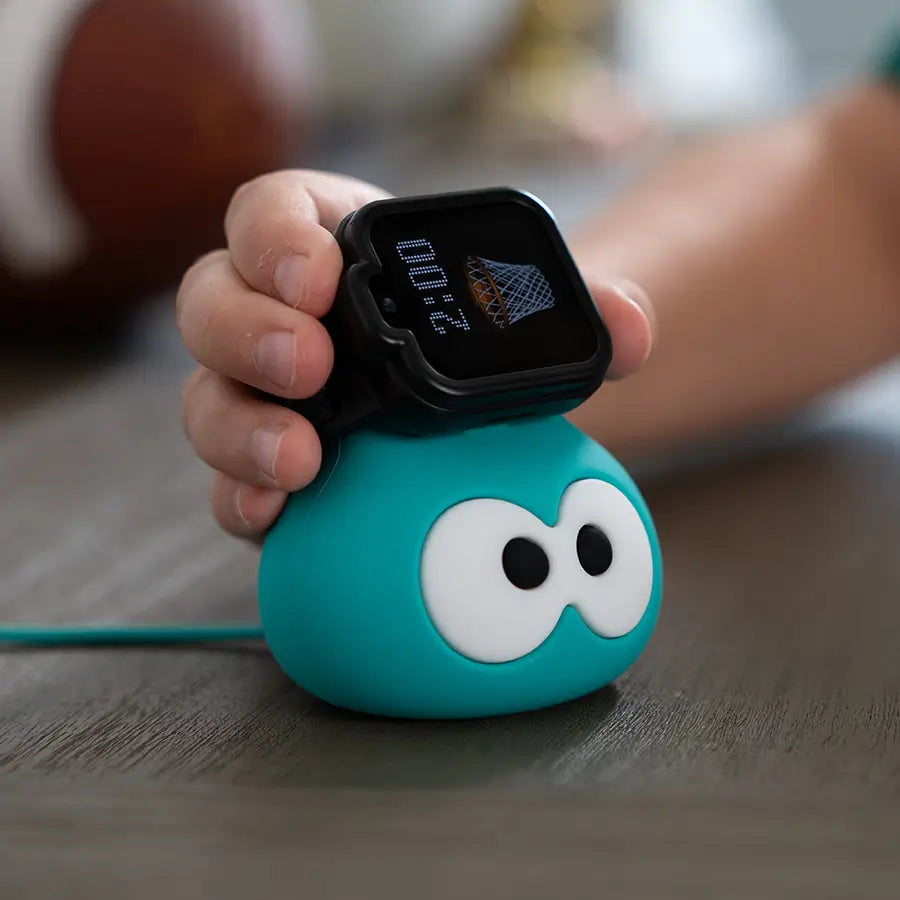
TickTalk 6 is the answer to years of listening. It is a slimmer, lighter kids smartwatch with a 1.6-inch AMOLED display, built-in eSIM, IP68 water resistance, up to 135 hours of standby time, and a connected service ecosystem, all without games, social media, or open internet. It launches September 2026 and was shaped, feature by feature, by what real parents told us they actually needed.
This guide walks through the thinking behind TickTalk 6: the problem the company exists to solve, the feedback themes that guided every design decision, and what Communication First. Safety Always. means for families in 2026.
What Is TickTalk and Who Makes It?
TickTalk is a kids smartwatch company built by parents, for parents. The device is a safe smartphone alternative, not a phone, not a toy, and not a watered-down smartwatch adapted from an adult product. It is purpose-built for children ages 3 to 12, combining two-way communication, real-time GPS, and parent-managed controls in a single wearable, without any internet access, social media, or games.
The TickTalk App, available free on iOS and Android, serves as the parent control center. From it, parents approve every contact, manage location settings, set up parent-managed DND / Focus, configure SOS and 911, and on TickTalk 6, access My Services, the in-app hub that centralizes wireless, travel, audio, protection, and support in one place.
TickTalk is trusted by hundreds of thousands of families and has been featured by Forbes Vetted, USA Today, Parents.com, and ABC News. The TickTalk 5 was recognized by SafeWise as the Best Battery Life Winner in the 2026 Kids Safety Awards. Every generation of the watch has carried the same core promise: connection and safety, without the smartphone's risks.
Why Did TickTalk Make a New Smartwatch?
The short answer is that families kept asking for more, and we kept listening.
TickTalk exists because of a tension almost every parent of a young child knows well. You want to be able to reach your child, and you want them to be able to reach you. But a smartphone is not the right answer for a kid who is eight years old, or six, or four. A smartphone brings the open internet, social media platforms, and an endless stream of apps designed to hold attention. Concerns about what that exposure does to children's mental and emotional development have grown considerably among parents and researchers alike, even if the full picture remains a subject of ongoing study. Those concerns were the motivation that shaped TickTalk from the beginning.
What we have learned over years of listening is that the problem parents want solved is not complicated to describe: reach my child, know where they are, and keep the internet out of it. What has become more complex over time is the world families actually live in and the situations they need a kids smartwatch to handle. Travel, long standby needs away from home, data continuity when a watch is replaced, connectivity that holds up in real environments, and a form factor that a five-year-old will actually wear all day. Those are the pressures that shaped TickTalk 6.
Is TickTalk a Trustworthy Kids Smartwatch Brand?
Trust in a kids product is earned through consistency, not claimed through marketing. TickTalk has built its reputation on a straightforward set of commitments: no internet on the watch, approved contacts only, parent-controlled settings managed through the TickTalk App, and a device that has been through rigorous testing to handle the active lives of children.
The brand carries a 4.8-star average product rating and has been recognized by independent outlets including SafeWise, Forbes Vetted, and USA Today. The company offers a one-year limited warranty, 30-day returns, and free U.S. shipping. For TickTalk 6, My Services brings that entire ownership lifecycle, including connectivity, travel, audio, protection plan, Smart Help, and trade-in, into a single section of the TickTalk App.
The transparency that parents expect from a children's product is something we take seriously. Data and privacy handling are described in TickTalk's published privacy policy. Safety and emergency features are designed to support, not replace, adult supervision and a family emergency plan.
What Do Parents Want in a Kids Smartwatch?
Over years of feedback, five themes have come through more clearly than any others. Each one shaped something specific in TickTalk 6.
Theme 1: Staying Reachable Without a Smartphone
The foundational ask has never changed. Parents want to call their child, hear their voice, and see their face when they need to, without putting a smartphone in their pocket. That desire is what every version of TickTalk has been built around. But the communication tools families asked for grew richer over time. Voice calls alone were not enough. Parents wanted FaceTalk video calling, so a child could look up and see a parent's face from across a field trip. They wanted in-app messaging that felt expressive, including voice messages, talk-to-text, emoji, GIFs, photos, eGreeting Cards, and group chat, because kids communicate that way, and forcing them into only one mode felt limiting.
TickTalk 6 carries the full communication stack: HD voice, FaceTalk video, secure in-app messaging, and SMS with approved phone contacts. What it does not carry is anything that opens the door to the open internet, social media, or unsupervised contact. Every person on the contact list is approved by a parent through the TickTalk App. Communication First is not just a slogan for TickTalk 6. It is the organizing principle that decides what belongs on the watch and what does not.
One feature that reflects the spirit of how kids actually communicate is TickTalkie, the LTE walkie-talkie built into TickTalk 6. It uses LTE or Wi-Fi for watch-to-watch push-to-talk, which means it operates well beyond the short range of a traditional walkie-talkie, wherever there is coverage. Kids hold the button, speak, release, and the message plays automatically on the receiving watch. It works between approved TickTalk Watch Friends on TickTalk 5 and newer. It is a kid-to-kid coordination feature, and parents cannot join a TickTalkie channel from the app. It makes the watch feel genuinely fun to wear, not just useful.
Theme 2: Comfort for All-Day Wear
A kids smartwatch that does not get worn is a kids smartwatch that does not work. Parents told us that comfort and wearability were a bigger practical barrier than any single feature. Children are active. They run, wrestle, roll around on grass, and forget the watch exists for hours at a time. A band that digs into a wrist, or a body that feels heavy or rigid, gets taken off, and that defeats the purpose.
TickTalk 6 was designed to be slimmer and lighter than the previous generation. The band is a washable stretch-fit comfort band made from breathable elastic nylon that swaps without tools and goes in the washing machine. It ships with a protective case included. The 1.6-inch AMOLED touchscreen at 320 x 360 pixels delivers a display that is vivid and easy for a child to read, without inflating the size of the watch case. The overall dimensions of 57.3 x 40.5 x 15.8 mm, including lugs, reflect deliberate choices around making the watch something a child in the age 3 to 12 range can wear comfortably across a full day, at school, at practice, at a friend's house, and at dinner.
IP68 water resistance means the watch handles everyday play without the need for parents to remind kids to take it off before they splash through a puddle or wash their hands. Water resistance can diminish over time, and IP68 describes controlled test conditions. It is not waterproof, but it represents a meaningful step forward in durability for daily life.
Theme 3: Connectivity That Holds Up
One of the most consistent pieces of feedback TickTalk has received is a version of the same frustration: the watch loses signal, or the GPS shows the wrong location, and that moment of uncertainty is exactly what parents were trying to avoid.
Connectivity is not a single problem. It is several overlapping ones, including cellular signal in fringe areas, GPS accuracy indoors versus outdoors, and SIM logistics that can become a hassle when things go wrong. TickTalk 6 addresses each of these. The built-in eSIM eliminates the physical SIM card, which removes a category of setup and troubleshooting issues entirely. In the U.S., TickTalk 6 uses a pre-installed TickTalk eSIM. There is no SIM to insert, no SIM to lose, and no SIM-related activation steps at a carrier store. Service runs through TickTalk Wireless, the company's in-house MVNO. For location, AI SmartPin allows parents to pin the correct position at familiar places, such as home, school, or a grandparent's house, and future location accuracy at those places is designed to improve over time. GPS accuracy always varies with coverage, environment, Wi-Fi availability, and cellular signal. AI SmartPin is designed to improve precision, not guarantee it. But the intention is that the places where parents check most often are the places where the watch gets progressively more reliable.
SignalBooster 2.0 is integrated into the TickTalk 6 band and is designed to work in concert with the watch hardware. The result, from a parent's perspective, is that the watch is designed to stay connected in the conditions real kids actually encounter, not just in ideal conditions.
Theme 4: Staying Connected While Travelling
Families travel. They visit grandparents in other states or other countries. They take holidays. They move. And a consistent theme in parent feedback was that international connectivity was either unavailable or involved more work than it should, including new SIM cards, plan changes, and carrier limitations.
TickTalk 6 introduces the Global Travel Plan, which covers 160 or more countries and regions. It is accessed and managed through My Services in the TickTalk App, which means parents can add a travel plan in the same place they manage everything else. Available functions vary by country, carrier, and network, and some destinations may be data-only rather than full voice and messaging. The point is not that TickTalk 6 works identically everywhere. It is that the path to international connectivity is now part of the TickTalk ecosystem rather than something parents have to figure out on their own.
For families with children in the 3 to 12 age range, that matters most during the moments when the stakes feel highest: a child separated from parents in an unfamiliar place, or a child who needs to hear a parent's voice during a first overnight away from home on an overseas trip.
Theme 5: Not Losing a Child's Photos and Messages When the Watch Changes
This feedback theme came later in TickTalk's history, once families had been through more than one device. A child upgrades from an older watch and loses the photos they took, the message threads they shared with grandparents, the greeting cards sent for birthdays. The watch holds memories, not just functions, and those memories matter.
T-Cloud is the TickTalk 6 answer to that problem. It backs up supported photos, videos, messages, and eGreeting Cards, and syncs account settings including contacts, app users, reminders, DND, location history, and music settings. When a new watch arrives, whether as a replacement or an upgrade, it can feel familiar faster. When the old watch still works, a direct Data Sync path is available watch-to-watch. The Primary User authorizes sensitive migration actions.
T-Cloud is designed to make the transition between devices feel like a continuation rather than a reset. That is particularly meaningful for children who have built up a shared message history with a family member who lives far away, or who have accumulated a collection of photos they took themselves.
What Do Parents Want in a Kids Smartwatch? The Full Feature Picture
The five feedback themes above translate into a set of features that parents consistently describe as non-negotiable. Understanding what to look for helps families evaluate any kids smartwatch clearly.
Must-Have Features for a Kids Smartwatch
Two-way communication that actually works. Voice calls, video calling, and messaging to approved contacts. Not preset replies only. Not text-only. The ability to have a real conversation, in real time, in the mode that fits the moment.
Real-time GPS with parent-facing tools. Location that updates reliably, paired with tools like AI SmartPin that make the location data more accurate at familiar places over time. Always qualified: accuracy varies by environment, coverage, and signal.
A parent control layer that is practical to use. Contact approval, location management, DND / Focus scheduling, SOS and 911 configuration, and the ability to manage everything remotely. TickTalk 6 centralizes these in the TickTalk App, with My Services handling the service-level controls alongside them.
Emergency access that is fast and simple. SOS by pressing and holding for five seconds to reach the emergency contact, and 911 calling when parent-enabled. The watch needs to be a reliable emergency device, not just a communication one.
A form factor a child will actually wear. Light enough, comfortable enough, and durable enough to survive a school day plus after-school activity without a complaint about wrist comfort or a dead battery. Standby time that carries through to the next morning matters in practice, and TickTalk 6 delivers up to 135 hours of standby time from a 700 mAh lithium-ion battery charged via 5V / 1A USB power source.
Age-appropriate content, not an open door. The watch should have no internet, no social media, no games, and no app store. What it should have is communication tools and, where content is offered, content that is parent-controlled and age-appropriate. TickTalk Radio on TickTalk 6 is curated by age, with Junior for ages 3 to 5, Explorer for ages 6 to 9, and Tween for ages 9 to 12, with no ads and no open search. Parents can preview and disable individual stations. TickTalk Radio requires a separate subscription and music availability varies by territory. Music stations are U.S.-only.
Connectivity built for the real world. A built-in eSIM removes SIM card friction. A Global Travel Plan removes the need to reconfigure connectivity when families cross a border. Both belong in a kids smartwatch designed for 2026, not 2016.
How Families Use TickTalk 6 in Practice
The features above are most meaningful when you see them in context. Here is how different families reach for different parts of what TickTalk 6 offers.
School-day families rely on parent-managed DND / Focus during class hours, real-time GPS with AI SmartPin accuracy at school, and the ability for a child to call or message a parent the moment school ends. The watch does not interrupt learning with games or notifications beyond the calls and messages parents have permitted.
Active and outdoor families appreciate IP68 water resistance for beach days, sports practice, and camping trips, combined with the long standby that means the watch is still on when a child gets home after a full day out. The washable band survives mud, sweat, and the washing machine.
Families with multiple kids use TickTalkie for sibling coordination, including neighborhood play, theme parks, museum visits, and camping. Kids hold to talk and release to send, coordinating across LTE or Wi-Fi wherever there is coverage. It is one of the features kids describe as genuinely fun to use.
Travelling families add the Global Travel Plan through My Services before a trip and stay connected across 160 or more countries and regions without managing a separate SIM or carrier account. Available functions vary by destination.
Upgrading families use T-Cloud and Data Sync to bring contacts, messages, photos, reminders, and settings forward from an older device. The new watch can feel familiar on day one.
Families giving a first device appreciate that the TickTalk 6 experience is deliberately bounded. There is no internet to stumble into, no social media to encounter, and no games to disappear into. FaceTalk video calls connect a child to a grandparent. TickTalkie connects a child to a sibling or a watch friend. Steps & Daily Goal gives kids a light, positive challenge. The watch is engaging without being designed to maximize time on it.
What makes TickTalk 6 different from most connected devices is not a single feature. It is the fact that every feature was chosen with the same question in mind: does this strengthen the connection between a child and their family, and does it protect them at the same time?
Best Practices and Expert Tips for Choosing a Kids Smartwatch
Parents who have thought carefully about the kids smartwatch category, and the TickTalk team, having supported families through multiple device generations, tend to arrive at a consistent set of recommendations.
Start with the communication use case, not the spec sheet. The most important question is not which watch has the biggest display or the most features. It is: can my child reach me, and can I reach them, in the ways that matter for our daily life? Voice, video, and messaging to approved contacts are the core. Everything else is secondary.
Think about wear compliance before you think about features. A watch that comes off at school, at practice, or at bedtime because it is uncomfortable stops solving the problem. Lighter bodies, softer bands, and longer standby time all contribute to a watch that stays on. TickTalk 6 was designed with wear compliance in mind throughout.
Understand what the watch does not do. No internet, no social media, no games, and no app store on the watch are features, not limitations. They are deliberate choices that keep the watch focused on its job. Parents who understand this before they buy avoid a category of frustration that comes from expecting app functionality that was never part of the design.
Set up the parent controls on day one. The TickTalk App is where the watch earns its value. Approve the contact list, configure parent-managed DND / Focus, set up SOS contacts, and test 911 if enabled. The more completely the TickTalk App is configured, the more confidently a parent can hand the watch to their child.
Talk to your child about how the watch works. The TickTalk 6 parent promise is more freedom for kids and more peace of mind for parents. That works best when kids understand what the watch is for: reaching family, knowing they can always call for help, and staying in touch without needing a phone in their pocket. TickTalkie, music, and greeting cards give kids reasons to enjoy wearing it.
Plan for the long term from the start. T-Cloud means that the photos, messages, and settings on TickTalk 6 do not have to be lost when the device is eventually replaced or upgraded. Building that continuity from the beginning makes the transition easier later.
Advantages and Benefits of a Kids Smartwatch Built Around Communication First
The argument for a purpose-built kids smartwatch over a smartphone is not primarily about restriction. It is about fit. A kids smartwatch designed around communication and safety is simply a better fit for a child in the age 3 to 12 range than a full smartphone is.
Connection without distraction. A child can reach a parent instantly. A parent can reach a child, call, or video chat in seconds. What the watch does not do is present an infinite scroll of content competing for the child's attention. Calls, messages, and alerts can still interrupt, as that is inherent to any connected device, but the scope of what the watch presents is deliberate and contained.
Safety as a foundation, not a feature. Real-time GPS, AI SmartPin, SOS, and 911 are not add-ons to a communication device. They are the floor the entire experience is built on. Safety Always is the second half of the TickTalk 6 product promise for a reason.
Parental control that is practical. The TickTalk App makes it possible to manage the watch from anywhere, at any time. Approve a new contact, check a location, set a focus window, or access the billing and plan management through My Services, all without picking up the watch.
A device that grows with the child. TickTalk 6 is designed for ages 3 to 12. The parent-managed contact list, the age-curated tiers in TickTalk Radio, and the parental controls all allow the experience to adapt as a child gets older and earns more independence, without replacing the device.
Continuity across devices. T-Cloud and Data Sync mean that upgrading from one watch to the next is not starting over. The investment a family makes in setting up contacts, recording memories, and building habits carries forward.
A single service ecosystem. My Services in the TickTalk App centralizes wireless plan management, the Global Travel Plan, TickTalk Radio subscription, TickTalk Care+ protection plan, Smart Help, and trade-in. Parents should not have to manage a kids smartwatch across four different apps and two carrier accounts.
How TickTalk Builds a Connected Service Ecosystem Around TickTalk 6
The shift from TickTalk 5 to TickTalk 6 is not only a hardware upgrade. It is the point at which TickTalk moves from being a device company to being a device-plus-ecosystem company.
The hardware changes are meaningful: the 1.6-inch AMOLED display at 320 x 360 pixels is a significant display improvement; IP68 replaces IP67; the built-in eSIM removes the physical SIM entirely; the slimmer, lighter body and washable comfort band with SignalBooster 2.0 address the comfort and connectivity feedback directly; and standby time of up to 135 hours gives families dependable performance in a lighter form factor.
But the ecosystem changes are what define TickTalk 6 as a generation. My Services brings the entire service lifecycle, including wireless, travel, audio, protection, support, and trade-in, into the TickTalk App. T-Cloud backs up and transfers the watch's most meaningful data. TickTalk Radio gives kids age-curated audio without ads, open search, or the need for a parent to vet every station individually. The Global Travel Plan across 160 or more countries and regions makes travel connectivity part of the standard offering rather than an improvised workaround. TickTalk Care+ provides a protection plan that can be added within the eligibility window.
The organizing idea behind TickTalk 6 is that everything a family needs to get value from the watch, including hardware, connectivity, content, protection, and support, should live in one parent-managed experience. That is what Communication First. Safety Always. means in practice: a device and a service that work together, parent-controlled from end to end, without games, social media, or open internet.
TickTalk 6 is available September 2026. Visit the TickTalk 6 preview page to learn more and be notified when pre-orders open.
The Future of Kids Smartwatches and What It Means for Families
The kids smartwatch category is growing because a real problem is growing alongside it. Families are navigating questions about when a child is ready for connected technology, what that technology should and should not include, and how to stay close to a child who is increasingly independent without making that independence feel like surveillance.
TickTalk 6 does not pretend to resolve every dimension of that question. No device does. What it offers is a clear, practical position: parents can reach their child, their child can reach them, they can see where the child is, and the watch does not bring the internet, social media, or games into the equation. That position has been the throughline of every TickTalk generation, and it remains the throughline of TickTalk 6.
The features that are new, including the AMOLED display, the built-in eSIM, the Global Travel Plan, TickTalkie, TickTalk Radio, T-Cloud, and My Services, are each the answer to something parents specifically asked for. That is the way TickTalk builds. It is how we have always built. And it is why, when parents ask why TickTalk made a new smartwatch, the real answer is: you told us to.
Ready to learn more? Explore the TickTalk 6 preview page and join the VIP early access list to be first in line when pre-orders open in September 2026.
FAQs About TickTalk 6 and Why TickTalk Built a New Smartwatch
Why did TickTalk make a new smartwatch in 2026?
TickTalk built TickTalk 6 in response to years of parent feedback. Families asked for better comfort and all-day wearability, a display that was easier for kids to read, built-in eSIM connectivity without a physical SIM card, international travel support, and a way to preserve a child's photos and messages when a watch is replaced. TickTalk 6 addresses each of those needs directly. The product promise, Communication First. Safety Always., reflects what parents have consistently said matters most: reaching their child, knowing where they are, and keeping the internet out of it.
What is TickTalk and what makes it different from a smartphone for kids?
TickTalk is a kids smartwatch and safe smartphone alternative designed for children ages 3 to 12. It supports HD voice calls, FaceTalk video calling, secure in-app messaging, and real-time GPS, all managed by parents through the free TickTalk App. Unlike a smartphone, TickTalk 6 has no internet access, no social media, no games, and no open app store. Every contact on the watch is parent-approved. The result is a device that keeps families connected without exposing a child to the open web.
What features should a kids smartwatch have in 2026?
The features that matter most in a kids smartwatch are: reliable two-way communication including voice, video, and messaging to approved contacts; real-time GPS with location tools that improve accuracy over time; parent-managed controls accessible from a companion app; emergency access via SOS and 911; a comfortable, durable form factor with meaningful standby time; and no internet, social media, or games. TickTalk 6 is built around all of these, and adds a built-in eSIM, Global Travel Plan covering 160 or more countries and regions, age-curated TickTalk Radio, and T-Cloud backup and transfer.
What is TickTalk Radio and how does it work on TickTalk 6?
TickTalk Radio is an age-curated audio experience for TickTalk 6, organized into three tiers: Junior for ages 3 to 5, Explorer for ages 6 to 9, and Tween for ages 9 to 12. Parents can preview and disable individual stations from the TickTalk App. There are no ads and no open search. The guiding idea is not the most content but the right content, matched to a child's age and approved by a parent. TickTalk Radio requires a separate subscription and current software. Music station availability is U.S.-only and subject to territory and licensing.
What is TickTalkie on TickTalk 6?
TickTalkie is the LTE walkie-talkie feature on TickTalk 6. It allows watch-to-watch push-to-talk communication over LTE or Wi-Fi between approved TickTalk Watch Friends on TickTalk 5 and newer. A child holds the button, speaks, releases, and the message plays automatically on the receiving watch. It works well beyond the short range of a traditional walkie-talkie, wherever there is coverage. TickTalkie is a kid-to-kid coordination feature, and parents cannot join a TickTalkie channel from the TickTalk App.
What is T-Cloud and why does it matter for families upgrading to TickTalk 6?
T-Cloud is the backup and transfer system built into TickTalk 6. It backs up supported photos, videos, messages, and eGreeting Cards, and syncs account settings including contacts, reminders, DND, and location history. When a family upgrades or replaces a device, T-Cloud helps the new watch feel familiar faster. A direct Data Sync path is also available watch-to-watch when the old watch still works. T-Cloud is designed to make device transitions feel like continuations rather than fresh starts, which matters when a child has built up a meaningful message history or photo collection.
How does the built-in eSIM on TickTalk 6 work?
TickTalk 6 uses a built-in eSIM, which means there is no physical SIM card to insert, replace, or troubleshoot. In the U.S., TickTalk 6 comes with a pre-installed TickTalk eSIM that connects to TickTalk Wireless, the company's in-house MVNO service. Setup happens through the TickTalk App. For international travel, families can add the Global Travel Plan through My Services, covering 160 or more countries and regions. Available functions vary by country, carrier, and network.
How accurate is the GPS on TickTalk 6?
TickTalk 6 provides real-time GPS location, and AI SmartPin allows parents to pin the correct position at familiar places, such as home, school, or a grandparent's house, so that future accuracy at those locations is designed to improve over time. GPS accuracy always varies depending on GPS signal, Wi-Fi availability, cellular coverage, and environment. AI SmartPin is designed to improve precision, not guarantee it. Location, calling, messaging, and safety features all require power, compatible service, and connectivity, and availability may vary. Safety and emergency features never replace adult supervision or a family emergency plan.
Share:
TickTalk 6 Features Guide 2026: AMOLED, eSIM, TickTalkie™, SOS and Controls
TickTalk 5 vs TickTalk 6 in 2026: What Actually Changed in the New Generation