

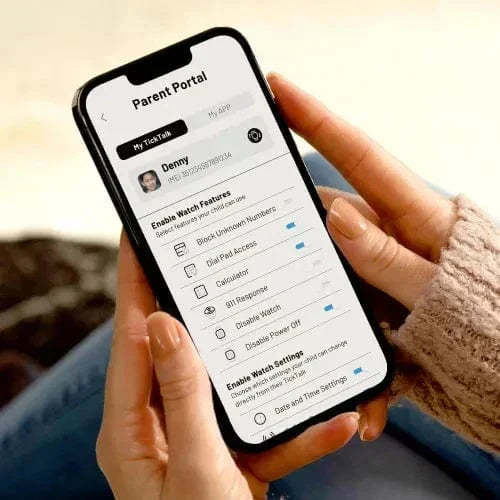
With our free TickTalk parental control app, you stay in control of the features you'd like your child to use on their TickTalk smartwatch. All messaging and video calling between you and your TickTalk takes place in our secure end-to-end encrypted app to offer your child the highest level of data protection.
In our free app available at the Apple and Google Play store, you can safely:
➡️ Use location tracking with History Route options including location smarten
➡️ See your child anytime, anywhere using Video Calling
➡️ Setup approved contacts for SMS Messaging
➡️ Sync watch photos & videos to your phone
➡️ Enable T-Cloud backup for data sync
➡️ Approve up to 53 parent-approved contacts and set individual access levels
➡️ Easily message your child and start group messages with the whole family in our Secure Messaging System with photo messages, emojis, GIFs, and voice recordings
➡️ Save an Emergency SOS contact and parent shortcut dial icons directly on your child's home screen
➡️ Access 20+ parental controls with toggle on/off options to block unknown numbers, view watch call and text logs, allow for911 emergency response and more!
In addition to these features, our parental control app is designed to give families peace of mind while keeping communication simple and secure. Whether you're checking in during the school day or reviewing activity logs, everything is easily accessible in one place.
The parental monitoring app capabilities allow you to stay informed about your child’s interactions without being intrusive. From tracking communication history to monitoring usage patterns, the parental monitoring app helps you stay connected and aware at all times.
With another layer of flexibility, the parental control app allows you to customize settings as your child grows, giving them more independence while maintaining safety. At the same time, the parental monitoring app ensures you always have visibility when it matters most.
Families trust our parental monitoring app to balance safety and freedom—giving kids the tools to stay connected while giving parents confidence and control.
Share:
How does messaging work on my TickTalk 4?
Using Add Friends on your TickTalk smartwatch