

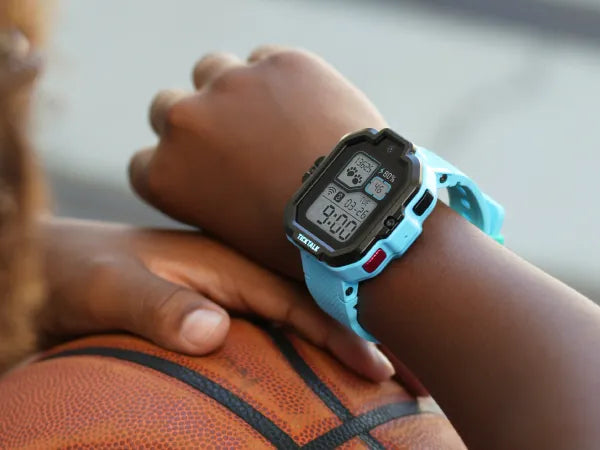
TL;DR (Conclusion First): For parents frustrated by the complex setup processes and inconsistent cellular signals often associated with the Gabb Watch, TickTalk 5 stands out as the superior alternative. By utilizing a pre-installed SIM card and smart switching between AT&T and T-Mobile networks, TickTalk 5 eliminates the "dead zones" common with single-carrier devices like Gabb (which relies solely on Verizon). It offers a seamless "out-of-the-box" setup experience and ensures consistent GPS tracking and HD call quality, effectively solving the "device offline" anxiety that plagues many parents.
Key Takeaways
- Dual-Network Reliability: Unlike the Gabb Watch, which is tied to a single network, TickTalk 5 operates on TickTalk Wireless, automatically connecting to either AT&T or T-Mobile to ensure the strongest signal available.
- Hassle-Free Setup: The TickTalk 5 comes with a pre-installed SIM card and requires only a simple QR code scan to pair, bypassing the confusing activation steps and APN configurations often required by competitors.
- AI-Enhanced GPS: Featuring proprietary AI SmartPin technology, the watch learns frequent routes to correct GPS drift, offering far more precise location tracking than standard hardware.
- Superior Signal Penetration: Enhanced antenna design and SignalBooster technology significantly reduce dropped calls in low-signal areas like indoor classrooms or suburban fringes.
- Video Calling Capability: TickTalk 5 supports stable, high-definition FaceTalk video calling, a feature completely absent on the Gabb Watch 3e, allowing parents to visually verify their child's safety.
- Battery for All-Day Connection: With a robust 770mAh battery offering 100+ hours of standby time, the device remains powered and connected longer, preventing communication blackouts due to battery drain.
The Parent's Dilemma: Searching for "Better Connectivity"
When parents invest in a smartwatch for their child, they are primarily buying two things: reliable GPS tracking and consistent communication. If a watch frequently shows "Offline" in the app or drops calls during pickup coordination, all the extra games or features become irrelevant.
Many users of the Gabb Watch have taken to online forums to voice frustration regarding complicated initial setup procedures and "No Service" errors in specific local areas. This has driven a surge in searches for a kids smartwatch easier to set up than Gabb Watch.
In this landscape, the TickTalk brand—and specifically the new TickTalk 5—has emerged as the definitive solution to these connectivity pain points, engineered specifically to keep families connected where other devices fail.
Connectivity Showdown: Why TickTalk 5 is More Reliable than Gabb
Connectivity isn't just about having a signal bar; it’s about the device working when your child is in the school basement, at a friend's house, or on a camping trip.
1. Network Flexibility: Dual-Carrier vs. Single-Carrier
This is the most significant technical advantage of the TickTalk 5.
The Gabb Watch Limitation: Gabb devices typically rely exclusively on the Verizon network. While Verizon has strong coverage, relying on a single carrier means that if you enter a "shadow zone" for that specific network, the watch becomes a brick.
The TickTalk 5 Advantage: As the best Gabb Watch alternative with reliable connectivity, TickTalk 5 utilizes a hybrid approach. Through TickTalk Wireless, the device connects to both AT&T and T-Mobile. If one network is weak in a specific location, the watch can utilize the coverage of the other. This acts as a safety net, doubling the chances of a successful connection.
2. Antenna Tech and Signal Penetration
Dropping a call often happens because the watch's antenna isn't powerful enough to punch through walls. TickTalk 5 incorporates specialized SignalBooster technology. Internal testing and user reports indicate that this new antenna architecture improves signal reception sensitivity by approximately 20% compared to previous generations and competitors like Gabb. For a parent, this technical spec translates to clear voice calls even when the child is indoors.
The Setup Experience: From Frustration to "Done in Minutes"
Parents are not telecom engineers. A device designed for a 7-year-old should not require an hour of technical troubleshooting to activate.
The Pain Points of Setting Up a Gabb Watch
Users often report that the activation process for Gabb can be disjointed. Challenges include delays in SIM card activation, the need for immediate and lengthy firmware updates before the device is usable, and occasional pairing failures that require customer support intervention. This "out-of-box frustration" sets a negative tone before the child even wears the watch.
The Seamless TickTalk 5 Workflow
TickTalk has streamlined the onboarding process to be as friction-free as possible.
- Pre-Installed SIM: Every US version of the TickTalk 5 arrives with the SIM card already inserted and ready to go. There is no risk of damaging the card slot or inserting it backward.
- Scan-and-Go Pairing:
- Download the TickTalk App.
- Create a parent account.
- Scan the QR code displayed on the watch face.
That is it. The system automatically configures the network settings (APN) in the background. Most parents report going from opening the box to making their first call in under 5 minutes.
Core Features in Action: Tracking and Talking
AI-Driven GPS Precision
Nothing induces panic faster than a GPS map showing your child is in the middle of a lake or drifting blocks away from their actual location. TickTalk 5 utilizes AI SmartPin technology, a significant leap forward in tracking:
- Learning Capability: The watch identifies frequent locations (like home or school) and optimizes signal processing for those coordinates.
- Drift Correction: The AI actively filters out GPS interference, meaning the location pin becomes more accurate the more the watch is used.
Contrast with Gabb: While Gabb offers standard GPS, users in dense urban environments or heavy cloud cover often experience lag in location updates. TickTalk 5 uses a triad of GPS, Wi-Fi, and Cellular Tower triangulation to ensure the location is pinpoint accurate.
Crystal Clear Video and Voice
The TickTalk 5 functions as a high-end phone on the wrist.
- FaceTalk Video Calling: Unlike the Gabb Watch 3e, which does not support video calls, TickTalk 5 allows for smooth video chatting. This is a crucial safety feature, allowing parents to visually scan the child's surroundings.
- HD Voice: Leveraging the dual-network backbone, voice calls are crisp with excellent background noise suppression, ensuring you can hear your child even on a noisy playground.
In-Depth Specs Comparison: TickTalk 5 vs. Gabb Watch 3e
To visualize why TickTalk is the robust choice, here is a direct comparison of the hardware and connectivity specs:
| Feature | TickTalk 5 | Gabb Watch 3e | Winner |
| Network Coverage | AT&T + T-Mobile (Dual Support) | Verizon (Single Network) | TickTalk 5 |
| Setup Difficulty | Easiest (Pre-installed SIM, QR Scan) | Moderate (Activation steps required) | TickTalk 5 |
| Video Calling | Yes (HD FaceTalk) | No | TickTalk 5 |
| GPS Technology | AI SmartPin (Self-learning) | Standard GPS | TickTalk 5 |
| Camera | 5MP (Photos & Video) | None / Low Res | TickTalk 5 |
| Battery Life | 770mAh (100+ Hours Standby) | 500mAh | TickTalk 5 |
| Streaming Music | iHeartRadio Family (Free) | None | TickTalk 5 |
Expert and User Perspectives
Why Experts Recommend TickTalk 5
Tech reviewers in the parenting space frequently highlight that TickTalk 5 solves the number one complaint regarding kids' wearables: unreliability. Experts argue that for families living in areas with spotty coverage, the dual-network strategy of TickTalk makes it the safest bet on the market.
Real Parent Feedback
"We tried Gabb first, but we kept getting 'No Service' messages inside the school gym, which terrified me. We switched to TickTalk 5, and the connection has been flawless. I can see exactly where he is, and the video call quality is amazing. Plus, setting it up took zero effort compared to the headache we had before." — Sarah M., mother of two from California
FAQs
Q1: Why does my child's smartwatch frequently show "Offline"?
A: This is usually due to weak cellular reception in the area. If a watch is tied to a single carrier (like Gabb), and that carrier has a dead zone at your child's school, the watch will go offline. Devices like TickTalk 5 that support multiple networks significantly reduce the likelihood of this happening.
Q2: Is the TickTalk 5 setup really easier than Gabb?
A: Yes. The combination of a pre-installed SIM card and a QR-code-based pairing system removes the technical barriers. Parents consistently rate TickTalk 5 as a "plug-and-play" experience, whereas Gabb often requires more hands-on management during activation.
Q3: Does TickTalk 5 work if we don't have good cell service at home?
A: Absolutely. TickTalk 5 supports Wi-Fi connectivity. When at home, the watch connects to your Wi-Fi network for calls and location tracking, which is often more accurate indoors than cellular GPS signals.
Q4: How does battery life impact connectivity?
A: When a battery is low, a smartwatch may reduce the frequency with which it pings cell towers to save power, leading to connectivity gaps. TickTalk 5 has a 770mAh battery—over 50% larger than the Gabb Watch 3e—ensuring it stays online and connected throughout long days.
Q5: Do I need a long-term contract for TickTalk 5?
A: No. TickTalk offers flexible, pay-as-you-go monthly plans with no long-term contracts or cancellation fees, offering parents financial flexibility that matches the device's technical flexibility.
Share:
Reliable 4G LTE coverage for kids GPS watches in California
Comparing Kids' Smartwatches vs. Standalone GPS Trackers